 Here’s a cool little tip that I wanted to share with you.
Did you know you can schedule Facebook Page updates directly in Facebook without the need for a third party app?
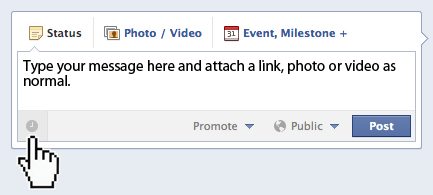
1. Simply click in the Status Update dialog box and type your message, add a link, photo, or video as normal.
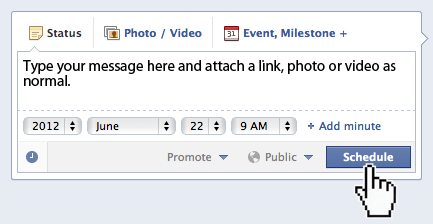
2. In the lower left of the window you will see a gray clock face, click it and the scheduler will appear.
3. Select your Year, Month, Day, Hour and even Minute then click Schedule.
That’s it!
Facebook now makes it easier to streamline your posting activities leaving you more time to interact with your communities.
Update: We put together a quick video tutorial for the Digital Photography Café show and wanted to share it here.
*The Current Photographer website contains links to our affiliate partners. Purchasing products and services through these links helps support our efforts to bring you the quality information you love and there’s no additional cost to you.

Founder of Current Photographer, co-host of The Digital Photography Cafe Show, Designer, Photographer, and overall tech geek.