 So if you haven’t heard about Smugmug’s new foray into the do-it-all camera app game you simply have not been paying attention. The app has received a great deal of attention and kudos from almost everyone who has tried it. But you might say that I haven’t rushed to be the first to review the app. In fact, I might be the last guy to review it. After having downloaded it when it was first released, I have recently started using it. Camera Awesome is one of those apps that is available for free with the ability to purchase additional filters and effects within the app. Filters and effects are available from as low as 99 cents. For $9.99 you can purchase everything.
So what does the app do? It is, of course, a camera that can be used in the photo or video mode. You may select any of the following composition tools: horizon, thirds, golden, and trisec. You may also select an effect to apply with all shots. Flash may be set to automatic, on, off, or continuous. Shooting mode may be single shot, image stabilization, big button, slow burst, fast burst, timer, and interval. The camera is easy to use and works like a charm.
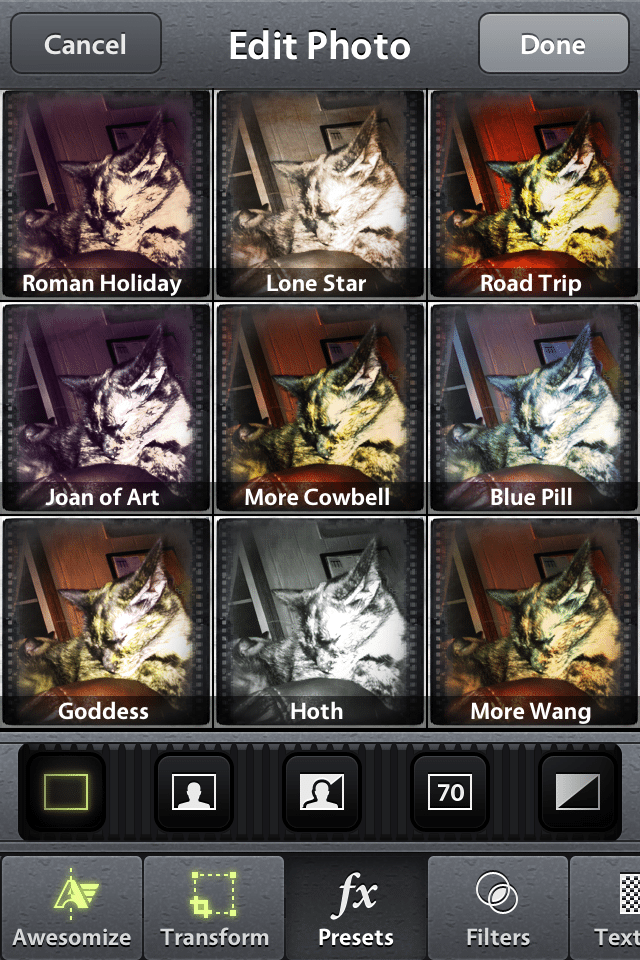
Once you make your photo, you can select effects. And what a selection! Under “Transform” you can transform your photo into a number of preset crop settings or rotate your image. The “FX Presets” menu lets you select from nine presets that are included with the app. Or you can choose from 99 optional preset effects, sets of which may be purchased from within the app. Your choices include five sets of 9 presets from Kevin Kubota, as well as others. What I like best about this part of the app is that you can easily see a thumbnail of each effect applied to your image and displayed 9 up on the screen. Under the “Filter” menu you may choose from 9 filters with come with the app and  54 more under such categories as Portrait, Vintage, B&W, and Kubota I, II, and III.
That’s plenty, right? Not if you’re awesome…
So now you get to select from Textures. You get the pattern here (no pun intended). You may enjoy 9 free textures or purchase additional ones from the following collections: Portrait, Destroyed, Paper, and Kubota I, II, and III. Then there are Frames. You guessed it! Nine free ones, and then select from the following collections: Film, White, Black, and Kubota I, II, and III.
Guess what? There’s more! There is also an “Awesomize” button. If you turn on Awesomize you can manually adjust sharpness, temperature, vibrance, and contrast. Effects are stackable, creating a huge number of possibilities.
So does Camera Awesome live up to its name? Most definitely! As a big fan of Smugmug, I am not at all surprised. In fact, if you combine the credibility of Smugmug with that of Kevin Kubota, you might expect that this might be something that is worth a look.
All the best…Mike
*The Current Photographer website contains links to our affiliate partners. Purchasing products and services through these links helps support our efforts to bring you the quality information you love and there’s no additional cost to you.

A college administrator by profession, Mike Kennamer enjoys the opportunity to take photos and improve his skills by shooting events at work, church, and for friends. He enjoys landscape photography, portraiture and is starting to dabble in HDR. His current photography project involves learning to control flash manually. “My goal”, according to Kennamer, “is to be the best photographer I can be.”
Kennamer is also the President of Kennamer Media Group, Inc., a provider of traditional and online media, specializing in the healthcare industry. On CurrentPhotographer.com he writes about iPhone and iPad applications for photographers.