 Look in the Mac App Store photography section, and you’ll see a number of tilt-shift apps (see one of my previous reviews) but not so many dedicated to standard blurring of fore- and backgrounds. Perhaps this is because of the relative complexity involved in making depth-of-field blur look realistic in software. Can Big Aperture for Mac (from Everimaging software) be the go-to app for this task?
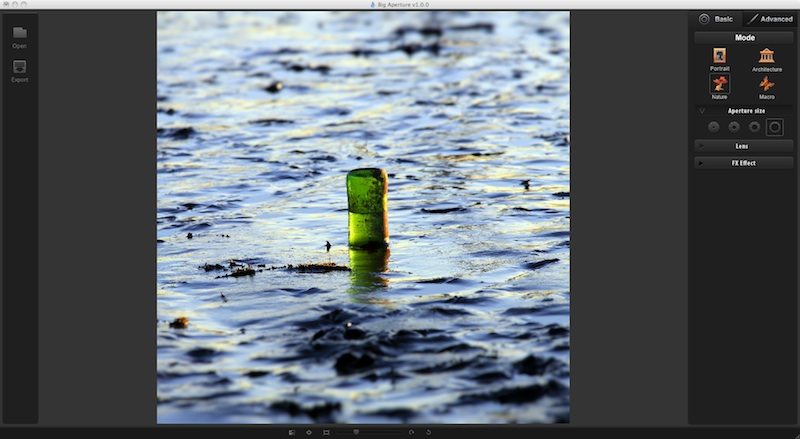
Big Aperture isn’t stacked full of controls, not least because the task it is set up to perform doesn’t require a vast set of menus. This provides the benefit of an uncluttered interface, which is already enhanced by Big Aperture’s classy, darkroom-style presentation.
There are two main control menus – Basic and Advanced. The Basic control menu – which I actually found the more useful – edits each image in what is, essentially, a four-step process. First, you select a blur “mode”; the selectable options are Nature, Portrait, Macro and Architecture, all of which act as presets. Their true function, however, is the selection of blur type; whether there is a sharp spot in the centre, with blur increasing outwards, or whether the blur is depth-based, with a horizontal plane of focus across the image, and blur increasing above and below this plane.

Mark Myerson loves photography, and in particular, hanging around waterfalls! Landscapes and nature have always been his staple, but he relishes any opportunity to take pictures. He also works closely with many local charities, regularly providing photographic coverage of fundraising events.
Mark is also a self-confessed tech-head and OSX lover – Apple is his favourite fruit!
Mark is the owner of Mark Myerson Photography, a Devon-based business that provides a large variety of photographic services to the local community and beyond. Whilst Mark Myerson Photography specialises in event, commercial and pet photography, almost every type of photographic assignment has been covered by the company.
If you have any photography or OSX-related questions, you can contact Mark via the links given below.