 Hello again readers! This week we are going to talk about an app called Retro Camera Plus. I downloaded it as a free app from Amazon, but now it will cost you $2.99. Lets see if the features are worth the price.
First off, once you install and open the app, you will notice an intro screen. You may click anywhere on the screen to start taking pics. In the lower left hand corner you can click on a photo icon which will take you to your Retro Camera Plus Gallery. In the lower right hand corner you will see an icon that will allow you to switch to different types of cameras (more on that later). Lastly, you have a shutter button which allows you to set a self timer of 5, 10, or 20 seconds. Its located just right of camera lens in the app itself.
Once you touch anywhere on the screen to begin taking photos, you may also notice a bubble level which is handy to get those nice and level shots. If you click on the camera type it will bring up a gallery of cameras to choose from. Cameras include: The Barbel, Little Orange Box, Xolaroid 2000, Pinhole Camera, etc. You can learn more about each camera by pressing about this camera below and to the left of it or to use it to take a photo by click use this camera. Once you have selected your camera to use, you also may notice just to the left of the lens a status window saying “ready to shoot” or “busy.” Right below that you will have the option to shoot in colour (color for us Americans) or Black + White.
One thing you will notice is that some cameras will take longer to process the photo than others. For example, The Barbel, took several seconds to process. However, the result is a really cool effect as shown below of a dandelion in my yard, which are currently in great abundance. I’ve included a few more that I took with some other “cameras” in the app.
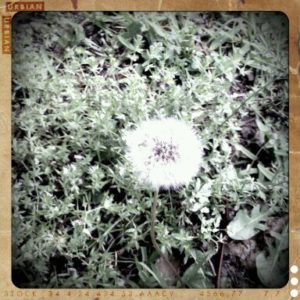 The Barbel

I am half outdoorsman and half technonurd hence my name thenaturenurd. I live in Texas with my wife, Melynie, 14 year old son, Cailean, and our four cats. I’ve been interested in photography since High School and mostly take landscape photographs but have also ventured into other areas of photography. My photography idol of course is Andel Adams, he did fantastic work. As a gadget nut, I hope to bring you clear concise reviews of Android photo applications and maybe even some tips for landscape photography. I look forward to the interactions…