 Yes, I am that guy. About this time every year I resolve to keep better records of expenses and about every time this year I am digging through my files to find all my receipts. I don’t know how much lost receipts have cost me over the years, but I’ve found an application that will help to keep all my receipts in one place.
Expensify is an iPhone app that helps you to keep up with your expenses and receipts. By linking the app to your credit card, it will import your expenses to Expensify and provide an electronic receipt that is easy to find. If you make purchases with cash, you can quickly and easily enter your receipts. I tested this on a recent trip and found it to be easy to use and a great way to keep up with receipts.
Entering a receipt is very easy. Simply open Expensify and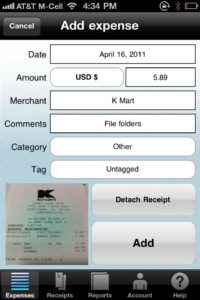 click on ‘Cash Expenses’ and ‘Add Receipt’. The date is automatically entered. You simply enter the amount, merchant, comments, and category. You can tag the expense if you’d like. To attach a receipt, simply click ‘Attach receipt’ then take a photo of your receipt. Once the data is entered, just click ‘Add’ for the transaction to be added to your account. It’s as simple as that. You now have that receipt saved on your phone and on the Expensify web site. Read More→

A college administrator by profession, Mike Kennamer enjoys the opportunity to take photos and improve his skills by shooting events at work, church, and for friends. He enjoys landscape photography, portraiture and is starting to dabble in HDR. His current photography project involves learning to control flash manually. “My goal”, according to Kennamer, “is to be the best photographer I can be.”
Kennamer is also the President of Kennamer Media Group, Inc., a provider of traditional and online media, specializing in the healthcare industry. On CurrentPhotographer.com he writes about iPhone and iPad applications for photographers.