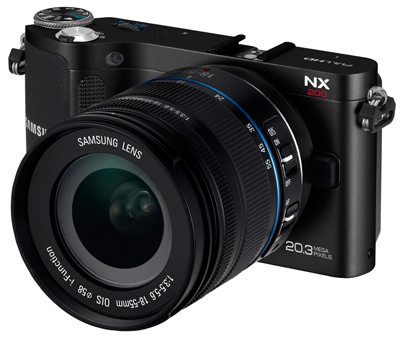
Design: Samsung has designed the NX200 to be quite sexy. Having an all black metal body, and what really stands out is the smooth curved textured grip on the right side. They have also packed in 2 scroll wheels. One on the top and one on the back, for changing settings and navigating your photos. On the top you’ll find a full hotshoe. Which can be used for the included external flash, or a transmitter when using off camera flash. Look on the bottom, and you’ll find the battery and SD card compartment. Under the plastic door on the left is where you’ll find the HDMI and USB ports. Last but not least is the 3” gorgeous AMOLED screen, which takes up the majority of the back of the camera. It’s bright, vivid, has deep blacks and works great outdoors.
 Handling: The curve and texture of the grip feel good in the hand, but the thinness of the body hurts it here. Making it difficult to hold one handed or pick up with one hand, without smashing most of the buttons on the back of the body. When holding with 2 hands though it’s very comfortable. While the NX200 offers up a beautiful screen with rich blacks and colors, you’ll still find yourself missing a viewfinder in certain situations. For instance when shooting moving subjects. Unfortunately they do not offer an electronic viewfinder for the NX200. One more thing you’ll find missing, is anyway to tether the NX200 to a computer. There is also no way to remotely trigger the shutter. All features you may have become accustomed to if you own a DSLR. I also found the arrow keys difficult to push, which are located within the scroll wheel on the back of the camera. Users with big fingers beware.
Menus: The menu system is very visual and gorgeous. They really put a lot of styling into the menus, and made the camera a pleasure to use. You can easily navigate through the menus using the scroll wheels on the top and back. It even includes a tip overlay to help you understand the settings better, and what they do. The Fn button is undoubtedly the most useful button on the camera. Push it and it’ll bring up the screen with all of the shooting settings. Allowing you to quickly get an overview of every setting and make changes. Using the back scroll wheel to move to the setting, and the top one to make any changes. Read More→


