Author Archive for Trevor Current

What is WordPress Multisite?

What is WordPress Multisite?To understand WordPress Multisite, you first need to know what the WordPress CMS (Content Management System) is. If you haven’t already, please give our What is WordPress? article a read and then come back to this one.


Multisite is a feature built-in to the WordPress core software, that when enabled allows users to create a network of subsites, all running under one WordPress installation.

Each subsite can use a subdomain name of the root site (i.e. site1.myphotosite.com, site2.myphotosite.com, etc). Using its built-in domain mapping feature, you can assign unique domain names to each subsite to better target your audience. This gives photographers the opportunity to really niche down their websites to create an experience that is unique to each client type.

The primary site could be the place where clients view all of your work, learn about all of your services, read your blog posts, etc.. Each subsite could be focused towards a specific type of client like…

  • Brides looking for a wedding photographer
  • Moms looking for a baby portrait photographer
  • An Agency looking for a food photographer
  • A buyer looking for Art to hang on their walls

By having unique websites for each niche, you can customize your portfolio, content, and experience to reach your perfect clients. Having focused sites also helps with SEO (Search Engine Optimization) and will allow you to optimize content for the keywords your clients are searching for.

Why use WordPress Multisite?

There are several reasons you may want to use WordPress Multisite for your photography business…

  • All subsites are within the same WordPress installation and share the same core files, Themes, and Plugins. That means you only have one website that you need to login to and one website to maintain.
  • Easy to learn. The Multisite Admin is very similar to a standard WordPress Admin.
  • You’re only paying for one Managed WordPress Hosting plan, not one for each site.
  • You can have 25+ subsites all with unique domain names.
  • All subsites come with a free SSL Certificate (this is a must have!).

WordPress Multisite is a cost effective way to have multiple websites for your photography business. You can really niche down and target your perfect clients with websites geared towards their specific needs.

It’s also a great way to build micro websites for your clients. Think about a customized “save-the-date” website for your Bride & Groom. What a great value-add for your clients, and what a great way to get visibility for your photography business.


Need help deciding if WordPress is the right choice for you? Feel free to Contact Us for a free no obligation consultation.

How to Use Facebook Ads to Build a Mailing List for Your Photography Business

Using Facebook Ads is a great way to sell your fine art and photography services, and if you set them up correctly, you can ensure that you will pay less for each click than you earn from each visitor on average. That means that your advertising campaign will make you direct ROI and you can keep investing more into your daily budget and get more out of it.

There are many different ways you can use Facebook Ads. Another example is to use them to build a mailing list and this can work incredibly well when it comes to selling your photography services. Here’s how…

Work Out Your CLV

The first thing to do, is to work out your CLV. This is your Customer Lifetime Value and it basically tells you how much each lead that engages with your brand is going to be worth to you. The idea is that someone who subscribes to your mailing list is likely to be a fan and therefore is likely to buy  from you. Moreover, they’re likely to buy from you again and again. If you have a subscriber who buys 10 prints or books multiple sessions from you over the course of a year, then they’re worth a lot more than they might appear on paper.

In order to calculate how much your subscribers are worth to you then, you need to work out what the average amount each subscriber has earned you so far is. Add up the total and divide it by the number of subscribers. This is your CLV.

Use CPA

Now comes the next acronym: CPA or Cost Per Action. This basically means that you’re paying for a particular action to be carried out, other than a click. You can choose from a variety of actions but the one we’re interested in of course is people subscribing to your mailing list. Using CPA in this way, you now only pay for subscribers, rather than paying for people who click and then may or may not subscribe to your list.

If you have previously calculated your CLV then this becomes a very simple formula for profiting from your mailing list. All you need to do is ensure you pay less for each subscriber than their CLV and that way, you’ll keep increasing your profits over time without any drawbacks!

Learn More About Facebook Ads

We’ve put together an easy-to-understand, step-by-step guide that takes the mystery out of Facebook Ads. With our online training you can go through the course at your own pace anytime, anywhere, from any device.

You’ll learn all of the technical aspects of Facebook Ads, and you’ll see how to get started with your own campaign.


5 Reasons Why You Should Post Pricing on Your Photography Website

I read a post on OffbeatBride.com that was the inspiration for this article. The post was titled
“An open letter to wedding photographers regarding their websites”. It’s kind of a blunt article about the design and content of photographers’ websites and what the author doesn’t like about them.

OffbeatBride.com receives over 600,000 visitors a month so it’s a fairly popular niche site. This particular post was very popular, receiving a lot of media attention and over 169 comments (anyone out there running a blog knows it’s hard to get 169 quality comments on one post). Even though the article was more about the website design, half of the comments were about the lack of pricing information on photographers’ websites.

Photographers have reasons why they don’t display pricing on their sites:

  • I don’t sell a commodity product, I offer a custom service
  • I offer custom packages and I need to evaluate the client’s needs before giving a price
  • I want to be able to negotiate with the client to come up with a price that works for both of us.
  • I don’t want to be locked in to pricing, I want the flexibility to adjust with the market.

Of course displaying pricing is not appropriate for all types of photography. For example, most commercial photographers quote out a project based on the clients needs. For the most part commercial photographers are dealing with educated buyers who aren’t necessarily shopping based on price.

When dealing with consumer photography like wedding, event and portrait, most consumers are not accustomed to buying these creative services and think of them more as buying a widget that should have a set price.

Obviously this is a hot topic, so in this article I’m going to give you 5 reasons why you should consider displaying pricing information on your photography websites or possibly lose out on getting those new clients.

  • Busy, busy, busy – In today’s rush, rush world, photo buyers are very busy. Most use the internet to search for photographers because they don’t have the time to scan through the Yellow Pages and make a bunch of phone calls only to get voicemail and have to wait for a call back. Immediate gratification is the key, they want the information, and they want it now!
  • Pressure Sales – No one likes a hard sell and people in general are hesitant to pick up the phone and schedule a meeting just to get pricing information. They feel like they’ll have to make a decision right on the spot without having time to think it over. Just think how you felt that last time you walked into an auto dealer!
  • Price First, Creativity Second – Budgets are very important and price often becomes the deciding factor. If your website viewers can’t easily find pricing they may move on to the next site that has it.
  • If I have to ask, I can’t afford it – You know the old saying. Without seeing a price some may assume they can’t afford your services and will move on.
  • Heartbreak – A couple comes to your site and falls in love with your work. They contact you for more information and may even set up a time to meet. You spend an hour or more together looking at your portfolio and going over their needs. You give them a price to capture their special day but come in over their budget. Even after negotiation they still can’t afford your services. The couple is now very disappointed and you both spend time and energy for nothing.

After reading the OffbeatBride.com article I did a little survey of my own on Twitter. A good number of photographers that responded say they include some pricing information on their website. I followed up asking if they feel it has helped gain new clients and overall the answer was yes. Jack Hollingsworth (@photojack on Twitter) ran a poll asking “Should Photographers display their price list (what they charge for creative services) on their website?”. 46% – Yes, 38% – No, 7% – Don’t have an opinion and 10% – Other. The combination of comments from the OffbeatBride.com article, Jack’s poll and my quick survey gives a good indication of what the consumer wants and how photographers have responded to meet their need.

Next Steps…

Consider posting some pricing information on your website. It doesn’t have to be a full blown price list with every option you offer. Maybe it’s something simple like “Prices start at $X” or post a range “From $X to $X”. If you’ve been in business for any length of time, you should know what the minimum cost for your service is and feel comfortable with that price. Put the pricing information on it’s own page, making it easy for potential clients to find. Refer to the information as Pricing or Cost of Services, don’t refer to it as “Investment” which was a real negative in the OffbeatBride.com article comments.

Pricing information will help weed out the people who love your work but just can’t afford your services along with the bargain hunters that you probably wouldn’t want to work with anyway. You can feel confident that when they contact you they’re already willing and able to pay your fee.

What are your thoughts about posting pricing on your website? Do you think it will help get more business for your studio or could it possibly hurt? Please share your comments below.


Win Over $2,500 of Photo & Tech Gear!

If you didn’t already know, I co-host The Digital Photography Cafe Show with Joseph Cristina, from J.Cristina Photography Tools, and we’re excited to announce a new giveaway.

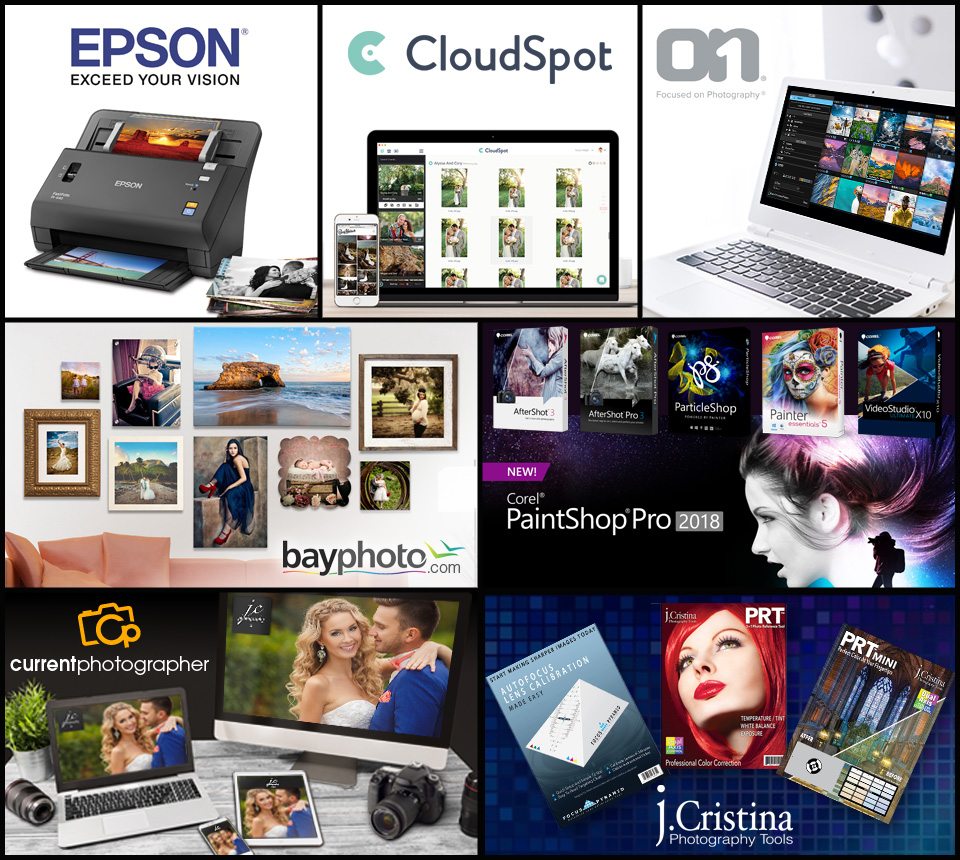
We’ve teamed up with some great companies to give away a huge Photo & Tech Gear prize package with a value of over $2,500.

Contestants can enter to win by visiting https://contest.digitalphotographycafe.com starting September 23, 2017 through October 1, 2017. One grand-prize winner will be selected on October 2, 2017.

All entrants will receive for FREE, a CloudSpot account + 50% off any upgrade on storage for an entire year, unlimited access to Current Photographer’s Facebook Ads Exposed online training course, a $30.00 value, and the Portrait Series™ Professional Retouching Brushes Adobe® Lightroom® presets from JCristina.com, a $25 value.

The Grand Prize Winner Will Receive…

  • BayPhoto – Winner’s choice of a 16×24 Acrylic Print, Metal Print or Wood Print – $225.00
  • CloudSpot – One Year of Unlimited Storage and Galleries – $948.00
  • Corel – Corel Creative Software Package – Including Brand New PaintShop Pro 2018 Ultimate, Painter Essentials 5, Perfectly Clear 3, AfterShot Pro 3, ParticleShop, and VideoStudio Ultimate X10 – $330
  • Current Photographer – Build your photography website – 1 year Managed WordPress Site Builder Plan – $220
  • Epson – Epson FastFoto FF-640 photo scanner – $650
  • J.Cristina Photo Tools – Focus Pyramid, PRT and PRT Mini – $75
  • ON1 – ON1 Photo RAW 2017.6 – $120

Grand Prize Total Value: $2,568

Don’t miss this chance to win some amazing prizes.
Head over to https://contest.digitalphotographycafe.com and enter now!


PPA Establishes Disaster Relief Fund for Members Affected by Recent Natural Disasters

ATLANTA, GA (PRWEB) SEPTEMBER 21, 2017

As the affected areas struggle to cope with the devastation and loss caused by hurricanes Harvey and Irma, and in anticipation of upcoming potentially threatening storms, Professional Photographers of America (PPA) has taken steps to assist photographers as they rebuild their lives. The PPA Board of Directors has secured up to $100,000 in matching funds for the Disaster Relief Fund as the Association continues its fundraising efforts.

“While PPA is not known as a relief organization, we are happy that through PPA Charities we can reach out to support our affected members with some assistance during the difficult recovery process from these devastating storms,” said Rob Behm, PPA President.

PPA Disaster Relief Fund is managed through PPA Charities, a 501(c)(3) organization. The intent is to disburse the money collected to PPA photographers located in the areas affected by the recent storms. PPA is challenging its other members, along with vendors and suppliers in the photographic industry, to join forces by contributing to the relief fund. Donations can be made at PPA.com/DisasterRelief. The grant will distribute funds to each PPA member or studio directly affected by these recent natural disasters.

To apply for the fund, PPA members in the disaster areas should visit PPA.com/DisasterRelief and fill out the application providing information and details including their name, studio name and address, brief description of damage/loss and how they can currently be reached.

About PPA
Professional Photographers of America (PPA) is the largest international nonprofit association created by professional photographers, for professional photographers. Almost as long-lived as photography itself, PPA’s roots date back to 1869. It assists more than 30,000 members through protection, education and resources for their continued success. See how PPA helps photographers Be More at PPA.com.


How To Grow Your Photography Business with Facebook Ads

Social media is one of the biggest tools that photographers have to promote their brands. It’s a direct, targeted, and personal means to connect with an audience. It lets you do this in a way that is persuasive and purposeful, and it allows you to create a real synergy between your marketing and your website or blog.

And when it comes to social media marketing, nothing beats Facebook!

Facebook is not only the biggest social media network by far, but it’s also the best suited to marketing with the widest selection of highly powerful tools and the most data for you to use to find the right audience.

Facebook has become one of the main reasons that we go online. Its users outnumber the population of any country on Earth and those members are more highly engaged than they are on any other site. Because of this, Facebook remains the single most attractive advertising opportunity in terms of native ad presentation, targeting, demographic data, active users, and a host of other factors.

A Few Facebook Facts

  • There are over 2.01 billion monthly active Facebook users
  • There are 1.32 billion daily active users
  • There are 1.74 billion mobile active users
  • There are 1.15 billion mobile daily active users
  • Five new profiles are created every second
  • Highest traffic occurs mid-week between 1 to 3 pm
  • On Thursdays and Fridays, engagement is 18% higher
  • Average time spent per Facebook visit is 20 minutes
  • One in five page views in the United States occurs on Facebook
  • 42% of marketers report that Facebook is critical or important to their business

All this paints a very clear picture of a social media network that has become a huge part of our lives and that is embedded as a cultural phenomenon. At a party, you are just as likely to ask for a stranger’s Facebook name as you are their mobile phone number. Facebook is used to plan weddings, to organize parties, to share holiday photos and to catch up with old friends. Even employers use Facebook to conduct background checks on future employees.

What does this mean?

It means that if you want to find a channel that will allow you to connect with a huge audience, then Facebook is the best place to do that. In short, if someone uses the web often for shopping, then there’s an extremely high chance that you will be able to find them on Facebook. If they don’t, then they’re not a particularly useful lead to begin with!

What are Facebook Ads?

What’s really great about Facebook as a business owner, is that it gives you the tools to reach that audience directly. Better yet, it gives you the tools to reach a specific sub-section of that audience and the ability connect with exactly the right kind of person who will want to buy your photography. It then allows you to convert those leads from cold leads, to warm leads, to customers – and to keep them highly engaged with your brand along the way.

Facebook Ads are one of the most effective ways to do this, allowing you to hone in on the perfect type of person that will want to buy your photography services. It allows you to do so in a manner that lets you tightly control your spending, ensuring that your advertising falls within budget and that you can scale it as you grow your business.

Then there are all of the advanced features – like CPA – and the amazing external tools that allow you to get even more from your advertising campaign, and to grow your business all the more effectively and quickly.

Like any tool, Facebook Ads are only as effective as the person using them. The campaign you design is what will ultimately impact your success or failure.

Introducing… Facebook Ads Exposed!

To help photographers take their businesses to the next level, we’ve put together an easy-to-understand, step-by-step guide that takes the mystery out of Facebook Ads. With our online training you can go through the course at your own pace anytime, anywhere, from any device.

You’ll learn all of the technical aspects of Facebook Ads, and you’ll see how to get started with your own campaign, your own page and your own brand.

But more importantly, you’ll see how to make sure that all those things are designed well and that they will give you the best chance of success. You’ll learn the ‘what’ but also the ‘how’ and the ‘why’. You’ll see that the most important place to start when creating your Facebook marketing plan is with the right brand and the right product and perfect synergy between those things. You’ll learn how to generate fans and followers and turn them into excited customers!

Topics Covered in Facebook Ads Exposed

Throughout this training course you’ll learn:

  • How to set up your Facebook Page and advertising account
  • How to create your first Facebook Ad
  • Advanced targeting techniques to find the perfect audience for your offer
  • The different types of audiences you can target
  • The different types of ads you can create
  • How to write amazing ad copy that will convert
  • How to devise a smart bidding strategy
  • How to use Facebook’s Ad Manager to track your progress
  • What is the Facebook Power Editor and who should use it?
  • How to create a “buyer persona” so you’ll know exactly who to target your ads to
  • CPA and the different types of ad campaign
  • How to implement Facebook re-marketing so you can target previous site visitors on Facebook
  • How to set bids and budgets
  • …and much, much more!

Don’t waste another minute, start growing your photography business today with
Facebook Ads Exposed!