 As a photographer, my main focus is landscapes, and my style is to try to keep my images realistic. Often, this means just using one well-balanced exposure, but at times, I need to use more than one exposure to capture what my eyes saw. Personally, I prefer to blend multiple images in Photoshop, by hand, but other photographers like the effect that HDR brings. For these folks, Photomatix is currently the king of HDR apps; amongst the challengers for Photomatix’s throne is Hydra – but is it regal material?
Hydra comes in two editions – standard and Pro – and the main differences between the two are the number of images which can be blended at one time (3 and 7 respectively), and the fact that Pro comes with Lightroom and Aperture plug-ins.
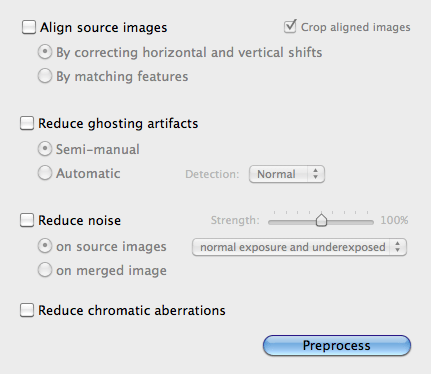
Loading images into the standalone app is easy – Hydra provides an image browsing window which allows you to view photos in your iPhoto or Aperture library, or on your hard drive. A quick drag-and-drop, and your images are ready for pre-HDR processing. The HDR-preparation process in Hydra is relatively minimal, largely consisting of EV (exposure value) and temperature adjustment, as well as manual image alignment, a crop function, and ghosting reduction controls. And just for the record, these work perfectly well.
The magic – a.k.a. HDR – happens on the develop menu. If you’re in a hurry, you can select from one of 11 presets, these ranging from “photorealistic” to “cyanotype.” For more control you can head to the adjust menu; here are all the standard image controls, which can be applied to the composite image.
There are two additional features, however, that make Hydra stand out from the crowd. The first is the option of “Snapshots.” During the HDR-adjustment process, you can make up to five different copies of your image, the idea being that you can temporarily save up to five different sets of image adjustment, and then compare them easily to choose the one that looks best. The other killer feature is “Probes.” Probes are basically local adjustments to your image, and they work in a similar way to Lightroom’s local adjustments – place a dot, and choose how large the area around it – the area to be adjusted – should be. Read More→

Mark Myerson loves photography, and in particular, hanging around waterfalls! Landscapes and nature have always been his staple, but he relishes any opportunity to take pictures. He also works closely with many local charities, regularly providing photographic coverage of fundraising events.
Mark is also a self-confessed tech-head and OSX lover – Apple is his favourite fruit!
Mark is the owner of Mark Myerson Photography, a Devon-based business that provides a large variety of photographic services to the local community and beyond. Whilst Mark Myerson Photography specialises in event, commercial and pet photography, almost every type of photographic assignment has been covered by the company.
If you have any photography or OSX-related questions, you can contact Mark via the links given below.