Welcome to Part 3 of the HDR Series – Getting Started! This time you are going to learn about the settings in a HDR Tone-Mapping software I use called Photomatix Pro 4. Before you get to the adjustments window you will be prompted with this window first.
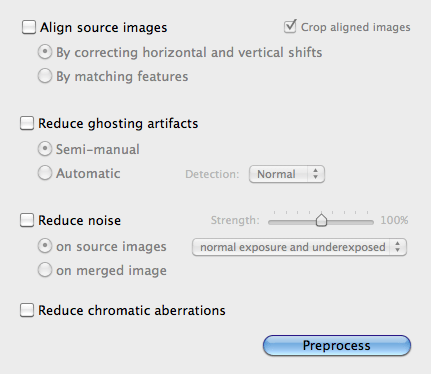
Align Source Images: I always keep this box unchecked unless I was using brackets shot by hand (which I never do). If you did shoot your brackets by hand you will want to make sure that “By correcting horizontal and vertical shifts” is selected and that the “Crop aligned images” are Unchecked. (This will save you aggravation later if you have to use layer masking in Photoshop) Read More→

Scott Frederick is known for his photography of land, city and urban exploration. His styles vary from HDR to fine art black and white including minimalism. When not using his DSLR, he likes to use the iPhone Hipstamatic app for fun. He is an avid blogger and social networker, who strives to inspire everyone to see the world through photography. He’s been awarded Editor’s Pick at HDRSpotting.com and continues to educate himself and others on new tools and techniques. Feel free to ask him any questions you may have about photography.