Archive for Printer

Enter Our Epson Stylus Wide Format Printer Giveaway!

We’re really excited to announce a new giveaway. Digital Photography Café has partnered with EPSON to give away one of their new Stylus Photo R2000 Wide Format Inkjet Printers.

The R2000 prints in wide 13″ format with a maximum sheet size of 13″x19″ and a roll size of 13″x44″. It is fully compatible with Epson’s full line of high-quality media and specialty papers and can even print on inkjet compatible CDs and DVDs.

Utilizing 8 individual ink cartridges, Epson UltraChrome Hi-Gloss® 2 pigment ink is delivered through Epson’s Advanced MicroPiezo AMC print head, yields beautiful archival prints with an unprecedented glossy look and feel.

The R2000 can be connected to both Mac and PC via Hi-Speed USB 2.0, 100Base-T Ethernet, Wi-Fi 802.11n or PictBridge.

The Epson Stylus Photo R2000 Inkjet Printer has an MSRP of $499.99 and you can learn more about it in the video below.

The giveaway starts Monday, May 21, 2012 and ends on Monday, May 28, 2012 so enter now.

Read More→

Droidography – HP iPrint Photo

iPrint PhotoWelcome back to my column.  How many times have you wanted to print a photo directly from your Droid to your printer?  I had wanted to do that an stumbled upon the iPrint Photo from HP a couple months ago.  Its pretty cool!  However, you need some specific hardware for it to work.

First you will need a HP Wireless Printer…ours is an HP OfficeJet 4500 Wireless running on our Wireless DSL home network.  Then you will need to download the app and be within range of your wireless network when you want to print.

Once you install and launch the app, you will be asked to select a photo.  Once you have done that, you can click on the photo to edit it.  If you choose to edit it you can crop it to print just the image you want.  If you choose to leave it as is, from the main screen you can click on one of the two other buttons available on the main screen at this point.  Print is the lowest one on the screen and its obvious what it does.  The other button allows you to go into settings and select your printer.  You MUST have your phone’s Wi-Fi on in order to print or search for printers on the network, just FYI.

Once your wireless printer is found, you can select paper size, image size, paper type, # of copies, and paper source.  Additionally, you can view these settings from the main screen.  All in all its a pretty neat way to get a hard copy of that cool pic you snapped with your Droid. Read More→

What Brides Want…and How to Deliver It – Free Webinar from zookie pro

zookie pro Logo

April 16, 2011 – PRESS RELEASE– The great minds at Zookbinders and zookie pro are hosting a series of online and in-person learning opportunities. The free-of-charge programs share 3 things every pro photographer should know: 1) What brides say they really want, 2) Why dreading album design is a thing of the past, and 3) How to increase sales while sleeping!

Webinar presented by Zookbinders and zookie pro…

What Brides Want…and How to Deliver It

Date: Tuesday, April 19, 2011
Time: Noon – 1:00 p.m. CDT
Place: On your computer…In the comfort of your home or office
Details: Free of charge | Registration required
More Info/Sign Up: http://www.zookbinders.com/zookbinders-events-schedule

Read More→

Review: Jim Richardson Takes a Look at the Epson Stylus Pro 4900 Printer

In the below video, National Geographic photographer Jim Richardson talks about his experience using the Epson Stylus Pro 4900 to produce prints for his recent “Around the World” Exhibition.
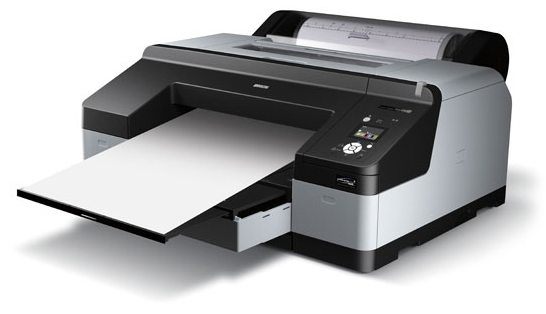
Epson Stylus Pro 4900 Color Printer

Jim Richardson traveled to nine different countries in 22 days, visiting places like the Taj Mahal, Luxor Temple, Machu Pichu, Easter Island, Australia, and Samoa. During his travels he captured amazing images, so he needed a printer with the ability to produce prints with different color scenes with incredible sharpness, saturated colors and true-to-life skin tones. Jim notes the Epson Stylus Pro was the logical choice, because not only was it able to produce prints with a high color gamut, but it also allowed for speed and convenience, especially when printing panoramic images with the roll paper feeder. Read More→

Epson Expands Line of Stylus Pro Printer-and-RIP Bundles

April 5, 2011 – PRESS SUMMARY – The Epson Stylus® Pro line of printing solutions is expanding once again with a wider selection of Designer Edition bundles that combine award-winning Epson Stylus Pro printers with an industry-leading EFI™ eXpress for Epson Software RIP. These bundles are engineered to deliver powerful yet easy-to-use solutions for professional graphic designers and photographers, enabling them to print their creative visions as they see them. The Epson Stylus Pro 4900 Designer Edition is now joined by the Epson Stylus Pro 3880, 7890 and 9890 Designer Editions.

Epson Stylus Pro 9890 Printer

Read More→

Epson Stylus Photo R3000 – 13" Printer for Photographers and Fine Artists

Jan 20, 2011 – PRESS SUMMARY – Epson America introduced its most advanced 13-inch printer to date – the Epson Stylus® Photo R3000. Designed for professional photographers and fine artists, the Epson Stylus Photo R3000 draws from the advanced technology of Epson Stylus Pro-series printers to deliver gallery-quality black-and-white output and vivid color prints. This printer also includes new features such as high-capacity individual ink cartridges, advanced media handling to support a wide range of paper types, and Ethernet and wireless-N connectivity.

Epson Stylus Photo R3000 Printer

Read More→