 Here’s a cool little tip that I wanted to share with you.
Did you know you can schedule Facebook Page updates directly in Facebook without the need for a third party app?
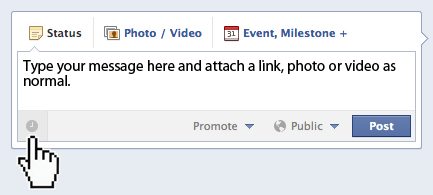
1. Simply click in the Status Update dialog box and type your message, add a link, photo, or video as normal.
2. In the lower left of the window you will see a gray clock face, click it and the scheduler will appear.
3. Select your Year, Month, Day, Hour and even Minute then click Schedule. Read More→

Founder of Current Photographer, co-host of The Digital Photography Cafe Show, Designer, Photographer, and overall tech geek.