
Archive for Inside WordPress – Page 3

Add Apple Pay to Your WooCommerce Store

WooCommerce is the most popular shopping cart plugin for WordPress powered websites and is used to sell everything from physical products, digital downloads, memberships, subscriptions, and much more.

Out of the box WooCommerce has five preinstalled payment gateways including PayPal, but with the additional Free Stripe Payments extension, you can accept credit card payments and now Apple Pay.

When a user visits your Apple Pay enabled store from their compatible device, they simply click the Buy with Apple Pay button and are then prompted to Pay with Touch ID. The system will automatically send the required shipping and billing information and process the payment, making the entire buying process much faster and easier. If the user’s device is not Apple Pay compatible, the Buy with Apple Pay button will not be displayed.

What about security?

We are firm believers that you should NOT store credit card and other sensitive information on your web server. PCI compliance is very difficult to maintain and the liability is great should the server ever become compromised. This is where a payment gateway like Stripe really shines. All of the sensitive data is passed securely through your website via HTTPS to the Stripe servers for processing and is never stored on your web server.

As Apple Pay and other tap and pay methods are gaining in popularity with tech users, there is still a perception of security risk with general consumers. Security and privacy is at the core of Apple Pay. When a credit or debit card is added to Apple Pay, the card numbers are not stored on the device or on the Apple servers, but instead a unique device-specific number is assigned, encrypted and securely stored on the user’s device. Then each transaction is authorized with a one-time dynamic security code.

Stripe’s Apple Pay feature is currently only available in 10 countries including Australia, Canada, Switzerland, Spain, United Kingdom, France, Hong Kong, New Zealand, Singapore, and the United States. If your country is not listed, sign up to be notified when it becomes available over on the Stripe Apple Pay website page.

WordPress 4.7.3 Security Release

WordPress issued a security release, version 4.7.3, and is now available for update.
This update addresses six security issues;

  1. Cross-site scripting (XSS) via media file metadata.
  2. Control characters can trick redirect URL validation.
  3. Unintended files can be deleted by administrators using the plugin deletion functionality.
  4. Cross-site scripting (XSS) via video URL in YouTube embeds.
  5. Cross-site scripting (XSS) via taxonomy term names.
  6. Cross-site request forgery (CSRF) in Press This leading to excessive use of server resources.

In addition to addressing the security vulnerabilities, WordPress 4.7.3 contains 39 maintenance fixes.

You can download this latest version from WordPress.org or update your existing install by going to your Dashboard > Updates, and clicking the link to update.

You can learn more about this security release here.


Since Current Photographer provides Managed WordPress Hosting, our clients don’t have to worry about upgrading their websites to version 4.7.3, because we take care of that for them. We backup the website files and database, run the core update, and then confirm the website is loading properly before going live. If we detect a problem, we’ll automatically roll it back to the state it was prior to the update and inform our clients of the issue. Automatic WordPress core updates is just one of the great features you get with our Hosting and Support plans.

What is a WordPress Plugin?

What is a WordPress PluginA WordPress Plugin is add-on software for the WordPress core that extends a website’s functionality or adds new features without having to write a single line of code.
The WordPress core software was designed to be lightweight to minimize code bloat, but flexible for expansion through Plugins. This gives the user the ability to tailor their website by adding only the functionality and features they need.

Plugins can extend both the front-side of a website, and the Administration side of a website. For example, you could add a Plugin for photo galleries, a contact form, e-commerce, online booking, etc., which would be displayed to your website visitors. You can also add plugins such as, Google Analytics, website security, backups, etc., that extend the functionality of the Administration side of the website.

Apple coined the phrase “There’s an App for that.” and in the WordPress community there’s saying “There’s a Plugin for that.” If you can think of a feature you need for your WordPress website, odds are pretty good there is a Plugin out there that will do the job.

Since Plugins are add-on software for WordPress, you have the ability to update the WordPress core software and WordPress Plugin software independently from each other.

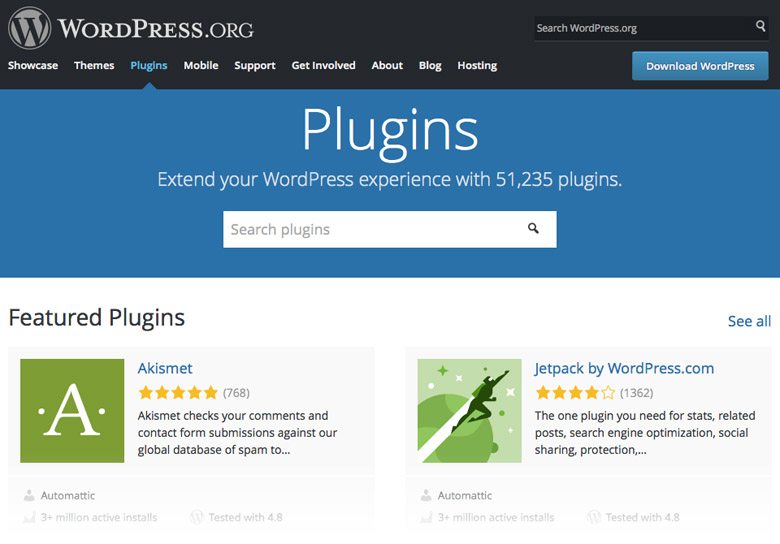
There are tens of thousands of free Plugins available for download in the WordPress.org Plugin Directory. There are also commercial or Premium Plugins available for purchase which in general are higher-quality, more reliable, and offer support from the developer should you have a problem.

WordPress Plugin Directory

As a Current Photographer customer you’ll have access to Premium Themes and Plugins that have been hand selected to meet the needs of today’s busy photographer. They provide a modern mobile-friendly design that beautifully displays your photography, allows you to captures sales leads, sell products and so much more!

Learn more about the benefits of our Managed WordPress Hosting and Support and Compare Our Plans to find one that best fits your needs.

What is a WordPress Theme?

A WordPress Theme creates the design and layout for the front-side of your website. This is what your visitors see when they browse your site. You can think of a Theme as a “skin” on top of the WordPress software that changes the look of your website… but it actually does so much more than that.
Warning! Geek Speak – WordPress Themes are a collection of template files that work together to produce the graphical interface that your visitors interact with. Each template file within a WordPress Theme controls a specific function. Those Theme files then work together with the WordPress core software and database to display the content to your viewers. So when your visitor clicks a navigation button, views your portfolio, or fills out a Contact Form, they are interacting with a set of Theme files.

Since Themes are add-on software for WordPress, they give you the flexibility to change them without modifying the core WordPress files. This also gives you the ability to update the WordPress core software and Theme software independently from each other.

All of your settings such as font style, color scheme, page layouts, etc. are made within the Theme. If you update the Theme software, some files may be overwritten and you will lose those settings. It is recommended that you build your website using a Child Theme (built from your main Theme) rather than building with the Parent Theme directly. Many modern Themes have the ability to create a Child Theme for you when the Theme is activated.

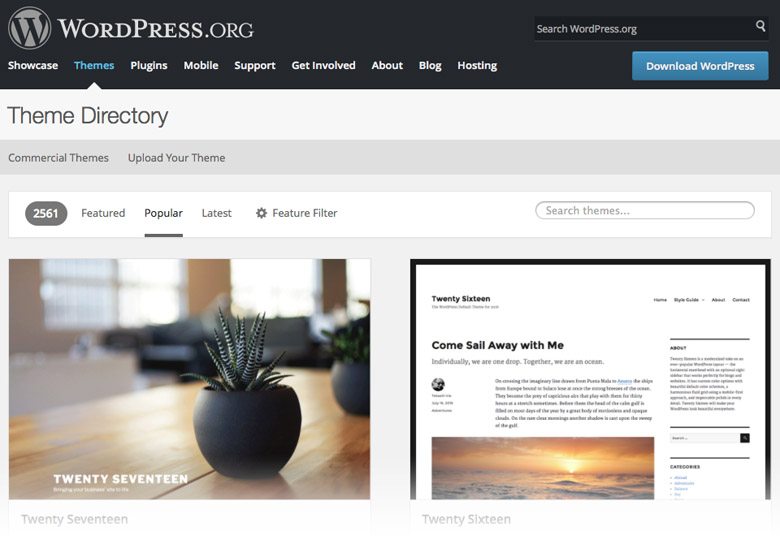
There are thousands of free Themes available for download in the WordPress.org Theme Directory. There are also commercial or Premium Themes available for purchase which in general are higher-quality, more reliable, and offer support from the developer should you have a problem.


As a Current Photographer customer you’ll have access to Premium Themes and Plugins that have been hand selected to meet the needs of today’s busy photographer. They provide a modern mobile-friendly design that beautifully displays your photography, allows you to captures sales leads, sell products and so much more!

Learn more about the benefits of our Managed WordPress Hosting and Support and Compare Our Plans to find one that best fits your needs.

What is a Content Management System?

A Content Management System or CMS, is a web-based application that enables users to create, edit, organize, and publish websites using their web browser. Content Management Systems are perfect for non-technical users and gives them the ability to update content on their website without knowing how to code or having to rely on a website developer.
Most content can be easily updated through the CMS Admin interface and can be done from anywhere in the world, all you need is a computer and internet connection.

There are many Content Management Systems available and among the most popular are Drupal, Joomla and WordPress. Each CMS platform has their own unique structure and method of doing things, and of course they all have their own strengths and weaknesses. Every CMS developer has their preferred platform and at Current Photographer we have chosen to use WordPress.

Why We Use WordPress

WordPress is the most popular CMS platform out there owning 50-60% of the global CMS market and it powers over 27% of all sites on the web. WordPress is very flexible and enables us to build just about any kind of website our clients can think of.

WordPress is also very client-friendly to use and gives them the ability to update content, manage files and documents, and even make tweaks to the design and functionality. As part of our Managed WordPress Hosting, we offer a full online WordPress Training video library to help get clients up and running quickly.

Check out our “What is WordPress?” article to learn more.

Maintaining Your CMS

It’s critical to maintain your website’s CMS, Theme and Plugin software. Keeping those up-to-date will ensure you have the latest features, and also the latest bug fixes and security patches which help to protect your site.

Before performing any updates to your website, we recommend creating a backup that you can restore your website from in case something goes wrong. There are several Plugins and services out there that will help with this process.

If you don’t have the time, or would rather someone else maintain your WordPress powered photography website, Current Photographer’s Support Service is for you. You’ll have peace of mind knowing that we’re keeping your website up-to-date, backed up, secure, and running fast.


Need help deciding if WordPress is the right choice for you? Feel free to Contact Us for a free no obligation consultation.

What is WordPress?

WordPress is an open-source, online publishing tool you can use to create your own website or blog. It was released in 2003 and initially used by a handful of people, but over the years it has grown to become the most popular website publishing platform in the world powering more than 40% of all sites on the web.

WordPress has always been thought of as “just a blogging tool”, but it’s so much more than that. It’s also a powerful Content Management System (CMS) that allows you to build and manage your own website and has the flexibility to change the design and add features through the use of Themes and Plugins.

Think of WordPress as an application that runs on a computer similar to Adobe Photoshop. But instead of it running on your local computer, it runs on a remote computer called a web server. Using your web browser, you access the WordPress application to build and display your site to the world.

What does “open-source” mean?

WordPress is an open-source platform, which means the source code used to create the application is made available to the public for free. Hundreds of volunteers from all around the world are constantly creating and improving the WordPress core, and there is a thriving community of developers creating both free and paid Themes and Plugins to expand the software’s capabilities.

The WordPress Foundation has committed to upholding the Open Source Initiative (OSI) mission and Open Source Definition through the OSI Affiliate Agreement. You can read more about the initiative here.

Themes and Plugins

Themes are software extensions that you install under the WordPress application to create the design of your website. They control the layout of your pages, colors and fonts, and some functionality.

Plugins are software extensions that add features like photo galleries, contact forms, social sharing buttons, shopping cart, etc., and extend the functionality of your website.

With the thousands of free and premium Themes and Plugins available, you can build just about any type of website you can think of.

Why You Should Consider Using WordPress

Open-source and Free – The WordPress software is open-source, which means it’s free!

Easy to Learn – If you can use software like Microsoft Word, then it will be easy for you to learn WordPress. As part of our WordPress Managed Hosting, we offer a full online WordPress Training video library to help get you started quickly.

You Own It – Most online website builder services use proprietary software. That means when you build your website using their service, they own the site, not you. If you should decide that you want to move to another provider, you’ll have to build your website all over again from scratch. WordPress is free, and many of the Themes and Plugins that you can use are free. That means you own it and can take it with you from one provider to another.

Search Engine Optimized – WordPress was designed to make it easy for search engines like Google and Bing to find and rank your website. Using available SEO Plugins, you can tweak and refine your content to help you rank higher in the search results and get discovered by your potential clients.

You’re Not Alone – WordPress owns 50-60% share of the global CMS market, no other CMS platform even comes close. Some of the biggest companies and news organizations out there trust in the power of WordPress including Sony Music, Adobe, New York Observer, New York Post, TED, USA Today, CNN, Fortune.com, TIME.com, National Post, Spotify, TechCrunch, Toyota, and NBC to name a few. But don’t let those big names scare you, WordPress is used by small companies and startups everyday to build their online presence, sell products, creative portfolios and membership sites, and so much more.

Check out the WordPress Showcase to see more examples of who’s using WordPress.


Need help deciding if WordPress is the right choice for you? Feel free to Contact Us for a free no obligation consultation.