
Archive for Inside WordPress

What is WordPress Multisite?

What is WordPress Multisite?To understand WordPress Multisite, you first need to know what the WordPress CMS (Content Management System) is. If you haven’t already, please give our What is WordPress? article a read and then come back to this one.

Multisite is a feature built-in to the WordPress core software, that when enabled allows users to create a network of subsites, all running under one WordPress installation.

Each subsite can use a subdomain name of the root site (i.e. site1.myphotosite.com, site2.myphotosite.com, etc). Using its built-in domain mapping feature, you can assign unique domain names to each subsite to better target your audience. This gives photographers the opportunity to really niche down their websites to create an experience that is unique to each client type.

The primary site could be the place where clients view all of your work, learn about all of your services, read your blog posts, etc.. Each subsite could be focused towards a specific type of client like…

  • Brides looking for a wedding photographer
  • Moms looking for a baby portrait photographer
  • An Agency looking for a food photographer
  • A buyer looking for Art to hang on their walls

By having unique websites for each niche, you can customize your portfolio, content, and experience to reach your perfect clients. Having focused sites also helps with SEO (Search Engine Optimization) and will allow you to optimize content for the keywords your clients are searching for.

Why use WordPress Multisite?

There are several reasons you may want to use WordPress Multisite for your photography business…

  • All subsites are within the same WordPress installation and share the same core files, Themes, and Plugins. That means you only have one website that you need to login to and one website to maintain.
  • Easy to learn. The Multisite Admin is very similar to a standard WordPress Admin.
  • You’re only paying for one Managed WordPress Hosting plan, not one for each site.
  • You can have 25+ subsites all with unique domain names.
  • All subsites come with a free SSL Certificate (this is a must have!).

WordPress Multisite is a cost effective way to have multiple websites for your photography business. You can really niche down and target your perfect clients with websites geared towards their specific needs.

It’s also a great way to build micro websites for your clients. Think about a customized “save-the-date” website for your Bride & Groom. What a great value-add for your clients, and what a great way to get visibility for your photography business.


Need help deciding if WordPress is the right choice for you? Feel free to Contact Us for a free no obligation consultation.

Google Kills Autoplay Videos, How will this Impact Your Photography Website?

Starting in Chrome 64, autoplay of media files on your photography website will be turned off… in some cases.

Google has been working hard to make web browsing better and safer for users. One way they can accomplish this is by controlling the user’s experience when using their Chrome browser.

In a previous article we talked about Google’s initiative to make web browsing safer by marking all websites not using an SSL Certificate as “Not secure”. While this will act as a warning, alerting users that maybe you shouldn’t really be visiting this website, it could also be detrimental to websites that haven’t yet added that layer of security. (If you haven’t already read that article, I encourage you to do so.)

One of the most common complaints people have when browsing, is the autoplay of media files. While we all love to watch cat videos and listen to music online, the unexpected autoplay videos and audio files are an unwelcome experience. It uses data and consumes more power on mobile devices, and makes unwanted noise while browsing at work 😉

I personally hate when I go to a website and a video starts playing somewhere on the page, and I have to scroll to fine it and turn it off.

What do most people do… they just close the browser window and most likely never come back!

This is a bad browsing experience, an personally I don’t think videos should autoplay, but I understand why people use this technique for marketing.

To combat this poor browsing experience, the Google Chrome browser version 64, will allow autoplay of media files when they won’t automatically play sound (i.e. you’ve set your YouTube embed code to autoplay but turned sound off), or the user has indicated an interest in the media file, and then will mark that as a preference.

These changes will also unify desktop and mobile web behavior, making web media development more predictable across platforms and browsers.

Chrome 63 will add a new user option to completely disable audio for individual websites. This site muting option will persist between browsing sessions, and will allow users to customize when and where audio will play.

These changes will give the user more control over the browsing experience, which from a user standpoint is a great thing. This will also force website owners to implement autoplay where it benefits the user experience, not necessarily your marketing needs.

Why should you care?

Back in the days of Flash powered websites, photographers absolutely loved autoplay music to accompany their slideshows. Often these websites had no way to mute the audio, so visitors would just have to mute their computer volume, or close the browser window.

I think most photographers caught on pretty quickly and decided that maybe the autoplay of music wasn’t a good idea as they saw their website visits, time on site, and phone calls drop off.

But believe it or not, I still come across photographer’s websites that have autoplay music in the background.

Google Chrome owns more than half of the browser market share, so if you’re one of those photographers with autoplay music on your website, it’s time to get rid of it, it’s going to stop working anyway! Instead, incorporate a more modern method of displaying your imagery giving the viewer the option to turn music on, not having to turn it off.

If you have an autoplay video embedded on your website that plays as soon as the page loads, make sure it’s embedded with the sound turned off.

If your intent of the autoplay is to grab people’s attention with the audio, it’s time to rethink that strategy. You’re much better off using eye-catching visuals over sound.

You can read more about the Google Chrome autoplay roadmap here.


Your WordPress 3.7 Site May Be Automatically Upgraded to 3.8

Is your website running WordPress 3.7? If so, you may soon be automatically upgraded to version 3.8. Better make sure your Theme and Plugins are compatible!

In a discussion this week, WordPress developer Aaron Jorbin asked if it was time to stop back porting fixes to 3.7 – 4.0 and instead update those sites directly to 4.1.

WordPress.org version statistics show that only 0.4% of tracked sites are still using WordPress 3.7 (introduced in 2013). As with all software, there needs to be an end of support for old versions to allow for future software development, and with version 4.9 fast approaching, now seems like the right time for 3.7.

The built-in upgrade system already handles minor version updates, but pushing a major update from WordPress 3.7 to 4.1 would cause many compatibility issues and broken sites. Of course the WordPress core team doesn’t want that to happen, so they are evaluating just pushing an update to 3.8, with an upgrade plan to get all sites running 4.1.

If your site is running a old version of WordPress, it’s time to think about upgrading. Creating a copy of your website to a test environment will allow you to update the WordPress core, Theme, and Plugins to confirm everything is working properly before going live.

If you need help upgrading your WordPress website, or are looking to migrate it to a powerful Managed Hosting platform, we invite you to give our offerings review, and if you have any questions, feel free to contact us for a no obligation consultation.

Chrome Will Begin Showing NOT SECURE Warnings to Your Website Visitors

Webmasters and site owners around the world started receiving emails from Google Search Console stating that their visitors will begin seeing NOT SECURE warnings when viewing their sites.
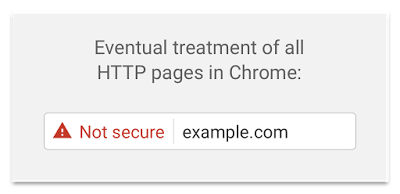
Back in September 2016 Google released a statement saying, beginning in January 2017 Chrome (version 56) will mark pages that collect passwords or credit card information using the HTTP protocol will be marked as Not secure. This indication will be made very prominent by placing it in front of the website url in the browser address bar. This move was part of a bigger plan to mark all HTTP sites as non-secure.

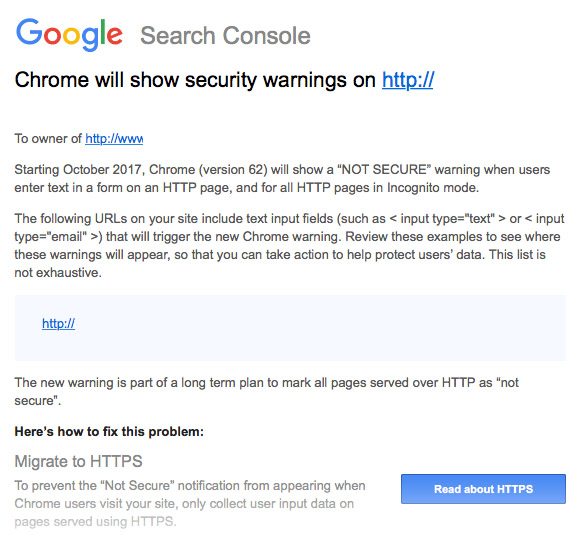
In April 2017 Google was making headlines again, confirming their plan and giving Webmasters and site owners 6 months to migrate to the HTTPS protocol. Starting in October 2017 with the rollout of Chrome (version 62) all web pages not using the HTTPS protocol will be marked as Not secure. Here is the notification email…

Check out our What is SSL and Why Do I Need it? article for more information.

Why should you care?

The once dominant Internet Explorer web browser has been on a steady decline for years. Its incompatibility with modern website technology, crashes caused by buggy coding, and security vulnerabilities have all paved the way for the new leader, Google Chrome.

According to W3Counter.com, Chrome now owns 64.0% of the web browser market share, with Safari coming in second at only 13.6%. That means the majority of your website visitors could be using the Chrome browser and if your website is NOT using the HTTPS protocol, they will get a warning message in the browser address bar, right next to your url.

Let’s face it, if you went to a website and got a warning message saying Not secure, would you stay on the site? Probably not! Most people don’t understand the changing internet technology, and as soon as they see the Not secure message they will leave thinking they are going to get a virus or something.

The release of Chrome 62 is only one step in Google’s plan to make the internet a safer place. Google is the number one search engine in the world, with YouTube being number two (which is owned by Google). Every time you (or one of your prospects) types a term in the search bar, Google will show the results that they feel best match the query. The search results are Google’s “recommendations” to you, and they only want to show you results that they feel are quality and safe.

The HTTPS protocol gives websites a level of trust with Google and the other search engines because of the verification process that is involved in getting the SSL certificate. So just by having https:// in front of your website address, you are increasing the likelihood that Google will rank you higher. But the opposite is true for sites still using http://, you most likely will see a drop in your search engine rankings.

So what should you do?

If you haven’t already secured your website with an SSL certificate, you need to do so today! Don’t wait until your rankings are affected, or worse yet, your prospects drop off because they feel your website is a risk.

Contact your web host to find out what SSL options they offer, and what the yearly cost will be. If your web host doesn’t offer SSL certificates, you should migrate your website to another host who understands the impact this change will have on your business.

Shameless Plug 😉

This article was written to inform the photo community of the upcoming HTTPS change. We feel strongly about taking action now to secure your website to avoid future problems and possible loss of business. If you have a WordPress powered website and your current host is unable to help you with your SSL needs, please contact us immediately. We’re happy to discuss your current website configuration and come up with a solution to fit your Managed WordPress Hosting and Support needs.

Help Save the Internet, Protect Net Neutrality!

Some of the biggest names online are coming together to help protect our internet. Amazon, Kickstarter, Twitter, Etsy, Netflix, and many more are joining the July 12th protest against the FCC’s attack on Net Neutrality.

Among this notable list of supporters is Automatic, the keepers of the WordPress CMS. They are encouraging the millions of WordPress website owners to support the cause by virtually signing the petition. They have even gone as far as creating a plugin that you can install on your website to encourage your visitors to get involved.

So what is Net Neutrality?

Net Neutrality is the idea that all internet traffic is treated equally. Whether you’re shopping on Amazon, streaming a movie from NetFlix, or reading a post on your favorite niche blog, your ISP (Internet Service Provider) would deliver that content at the same speed without blocking sites, slowing down, or charging extra fees for delivery.

Net Neutrality levels the playing field and allows online businesses small and large to reach customers, and protects free speech by prohibiting ISPs from slowing or blocking sites or messages they don’t agree with.

How can you help?

If you believe that the internet should be open and free, then join fight by sending a message of support to the FCC. On July 12, 2017 visit BattleForTheNet.com and install the WordPress Net Neutrality plugin.

WordPress Paying Bug Bounties on HackerOne

WordPress is an Open Source Content Management System that allows users to build websites and blogs. We’ve been using the WordPress platform to build websites for our clients since 2009 and feel it is the best free CMS available today. And we’re not the only ones, WordPress now powers more than 28% of all sites on the web.

Because of the nature of “Open Source”, the WordPress core software is openly available to anyone in the world to use, including hackers! This unfortunately gives them the ability to spend countless hours trying to find bugs and flaws in the code to exploit for malicious purposes.

The Security Team at WordPress has been working hard to combat hackers, and to take it a step further, they have officially joined HackerOne.

The HackerOne platform was designed so security researchers can report vulnerabilities to the WordPress Security Team in a safe and responsible manner. They began working on this project privately just over a year ago and have finally made it public.

With the HackerOne announcement, WordPress has also introduced bug bounties. They reward reporters for disclosing issues to better help secure the WordPress platform. They have already awarded over $3,700 in bounties to seven different reporters.

So what does this mean for your WordPress powered website?

It takes a village to keep a project like WordPress moving forward, and the core contributors can’t do it alone. With the addition of the HackerOne community seeking those bug bounties, it will allow the WordPress Security Team to work more efficiently to patch the code and push security updates to your website.


At Current Photographer we take security very seriously. With our Managed WordPress Hosting, we make sure that our client’s websites are backed up daily, and protected with multiple firewalls throughout our enterprise-grade infrastructure. Our real-time security threat detection, and security audits and code reviews help to keep client’s sites safe. Should a website become compromised, we will immediately take action to find the exploit, remove the malicious code, and have the site back up and running in no time.