The Romans had amazing floors, didn’t they? I am, of course, talking about their mosaics – amazing arrays of tiny tiles, which, when looked at from a standing height, formed stunning images and designs. The principle of many tiles making an image is the same principle which digital images use today, with the difference being that the tiles are replaced by pixels. Considering this similarity, it is hardly any wonder there are so many digital mosaic apps available, usually allowing you to create a mosaic from images in your library. Waffle, by Square Candy, is a minimalist example of this, but is it the equivalent of those exquisite Roman tiles, or does it produce something closer to concrete slabs?
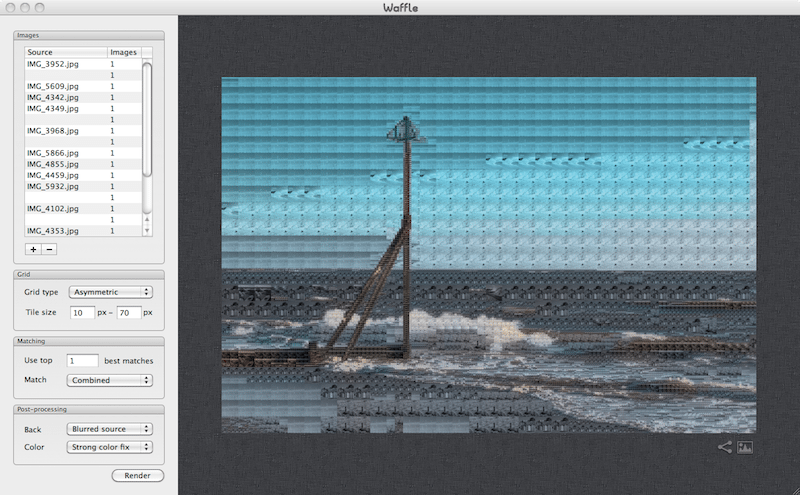
Waffle isn’t really about bells and whistles – this really is a pared-down app. You choose the picture to be recreated in mosaic form, and select the images to be used as the “tiles.” You then have two options as to what kind of “tiles” to use. The asymmetric option asks you to choose a minimum and maximum tile size, and then Waffle will use larger tiles on areas of a similar colour, and smaller tiles where detail is needed. I found that this worked okay when your mosaic base image was quite large, but if you use a smallish image (under 1000×1000 pixels, for example), the results from this option start to become unusable. Admittedly, when the asymmetric option works well, it looks funky, but it’s a hit-and-miss affair. The other option available, symmetric, simply allows you to select an exact tile size, and, in general, it works far better, even if it lacks the quirkiness of the asymmetric look.

Mark Myerson loves photography, and in particular, hanging around waterfalls! Landscapes and nature have always been his staple, but he relishes any opportunity to take pictures. He also works closely with many local charities, regularly providing photographic coverage of fundraising events.
Mark is also a self-confessed tech-head and OSX lover – Apple is his favourite fruit!
Mark is the owner of Mark Myerson Photography, a Devon-based business that provides a large variety of photographic services to the local community and beyond. Whilst Mark Myerson Photography specialises in event, commercial and pet photography, almost every type of photographic assignment has been covered by the company.
If you have any photography or OSX-related questions, you can contact Mark via the links given below.