Archive for iTunes

OSXcellence – Picturesque

As keen photographers, when we present our images on paper, we will often spend a lot of time (and money) on making the presentation of our images beautiful. The same care is often not taken when we publish images online. Perhaps this is as a result of the unlimited nature of the internet, as well as the speed at which it operates. Whatever the reason, perhaps we should start taking a little more care, not least because more and more, we view images on-screen – a trend which isn’t likely to reverse any time soon.

Acqualia, the makers of the popular Mac spreadsheet/calculator hybrid Soulver, have created their own app for streamlining the process of digital image presentation – Picturesque. But are you better off sticking with Photoshop?

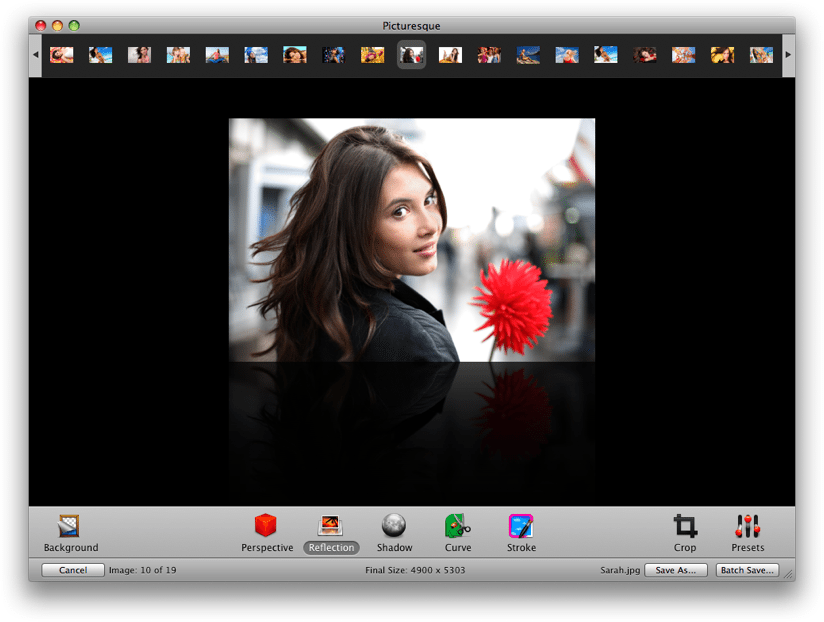
The idea of Picturesque is to make the process of creating reflections, shadows and rounded corners straight-forward. Drop your image into the app, and almost instantly, you’re ready to edit within Picturesque’s smooth, clean interface. There are, essentially, 5 different options: perspective, reflection, shadow, corners and stroke.

The perspective tool allows you to position your image at a 3D angle, as if rotating a piece of paper in space. The usefulness of this feature? Well its use isn’t exactly obvious……shall we move on?

The reflection tool allows you to apply an iTunes coverflow-style reflection below your image, and I can imagine this being quite useful for creating a certain look on websites, although generally speaking, this isn’t of great use to photographers. If you do want a reflection, however, Picturesque provides you with customisation options (length, opacity, offset) whilst also retaining rapid use, and the finished product is very much one of quality.
Read More→

WordFoto: Your Photos + Stylized Text = Awesomeness!

When you review IOS apps you tend to experience a sense of deja vu in that so much of what you see has already been done, and done, and done… So finding new and exciting apps to share with the Current Photographer readers becomes progressively more difficult as time goes on, and so much of what I see is just a different twist on something that has already been done–and sometimes overdone. After all, my goal in writing these reviews is to share with readers apps that I actually use. And frankly, I don’t use seventeen apps that do the same thing. I select my favorite and use it.

WordFoto is not the first app of its kind that I saw. There are others out there, but I was not satisfied with them enough to actually use them for my own photos. But finding another such app ultimately led me to WordFoto.

WordFoto allows you to take or select a photo, add one or more words, and it works its magic by combining the words and photos in an attractive format. Here is a photo that I took in the app while writing this article. Yes, I stopped just now and took it, cropped it within the app, and uploaded it to Dropbox from my iPhone 4. Then I went into the “Words” menu in WordFoto and added a new word set that contains the words, “Zeke”, “cat”, and “meow”. I selected that set then went to the “Style” menu. For this photo I selected “Classic Color” and it is ready to export to the camera roll. Read More→

Foap IOS App: Sell Stock Photos on Your iPhone

If you are a photographer it is likely that you have at least considered signing on with a microstock agency to sell your stock photos. Some photographers make a very good living selling stock photos. But how many of us make a living selling stock photos from our iPhones? Me either. But is is possible to generate some income from photos taken on your iPhone or other smart phone?

The folks at Foap say they can make that happen. The concept is simple. Download the Foap app and sign up for an account. Then upload your photos through the app. Once your photos are approved they will be added to the Foap website where they may be purchased for $10 per download. You get $5 per purchase and Foap keeps $5. It’s pretty much that simple.

So are you ready to strike it rich by selling photos on your iPhone? My guess is that you will not. But could you generate some extra income for your iPhone photos? Perhaps. My job is not to critique the concept, but to review the application.

Read More→

Apple Introduces the iPhone 5

After much speculation, rumors and leaked photos, Apple finally announced the new iPhone 5 on Wednesday, September 12, 2012. Those following the chatter online probably weren’t surprised by much.

The increased height shown in the leaked photos was right on. That extra real estate allows for a larger 4″ diagonal screen that is closer to the 16:9 widescreen format we’re all used to. Of course Apple is using their Retina display with a resolution of 1136×640 pixels at 326 ppi.

The iPhone 5 is also thinner and lighter than the previous iPhone 4S which made fitting all of the components in the body more challenging. The new radio chip and A6 processor were redesigned to be smaller to fit in this compact area and Apple claims the battery life is equal to or greater than the 4S.

Taking advantage of the new LTE mobile networks and dual-band WiFi, data download speeds are faster than ever. LTE could see download speeds up to 100 Mbps and the dual-band WiFi up to 150 Mbps. For many internet users, these speeds are faster than their home networks.

Since we’re all photographers here, let’s talk about the cameras. The iPhone 5 has two, an 8MP rear facing camera and 1.2MP front facing camera. The front camera can be used to shoot photos and 720p HD video up to 30 frames per second. The rear will shoot 1080p HD video up to 30 frames per second and the iPhone 5’s improved video stabilization will help to prevent shaky footage. Read More→

Discover the World From Your IOS Device with Trover

I love looking at photos. Places, people, still life, abstract…I enjoy seeing how others see  the world through their camera lens. Perhaps that’s why I enjoy Instagram so much. Where else can you discover the world from the comfort of your own home? That’s why I also like Trover.

With Trover, you can discover new places everyday, and post your favorite photos from the places you have been. I am just discovering this great app, but have had a good time seeing new places and recognizing photos from places that I have been.

When you post a photo, or a discovery as they call it, you may do so either by taking it from your camera or choosing from your photo library. For instance, the photo at right is one that I took out my window at the Grove Park Inn in Asheville, NC. I was able to select the location from a list. Had my location not been listed, I could have added my own. You may also add details, tips or tags to help others enjoy your discovery. You are then taken to a screen where you may post your discovery to Twitter, Facebook, or Tumblr. Once you do that, the photo is posted on Trover for others to see.

The main menu includes the following items: Home, Your Feed, Post a Discovery, Notifications, and Invites & Settings. At the home button, you will see the Newsfeed, Friend’s Discoveries, Nearby Discoveries, What’s Hot, What’s New, Featured Discoveries, Featured Trovers, Featured Lists, Places, and Search. There is so much to discover in this app that you will find so many new places that you will want to visit. Read More→

Turn Your Photo Into a Work of Art with ArtinPhoto IOS App

So much of what we see in the “New and Noteworthy” in iTunes seems to be more of the same. So it’s nice to run across something unique in the App Store. Such is the case for the ArtinPhoto IOS app. This 99 cent app allows you to add a black and white sketch within your existing photo or photo taken from your IOS device. There is a free, ad-supported version also.

It’s very easy to use and, aside from the annoying photos of random hands that hold many of the available frames, it produces some very nice results. You simply choose or take a photo. Make your selection of sketch frame, sketch type, and sketch brush. Press the “Play” button, and the app does all the work for you. You can then save your photo or share it via email. Read More→