Archive for Photo App – Page 2

Amazing Effects with Camera Art FX Free!

There are so many filter and effects apps out there that I don’t try to review them all. Instead, I try to review unique apps. However, Camera Art FX Free is one that caught my eye.

Camera Art FX Free is a unique iPhone application that allows you to have a lot of fun by applying the following effects as you take the photo: Pencil Sketch, Ink Sketch, Cartoon (my favorite), Poster, Vintage, Watercolor, Comic BW, and Comic Book. You simply select your effect and shoot either a still photo or a video.

It’s so simple that there is not much to say. However, I’ll share some images with you so you can see how fun it is. And yes, it’s free, provided by Audacity Software Pte, Ltd. So stop reading this and check it out!

All the best…Mike

Droidography – Photo Illusion

Photo Illusion Android ApplicationLast time, I talked about Camera Illusion. Now we will talk about its companion app called Photo Illusion. As the name implies it works with the photos already on your Droid in your gallery. Its not very large so should fit on your phone just fine…

If you read my post on Camera Illusion, once you install Photo Illusion and open it, you will see the setup is quite similar. There are three buttons on the screen the two on the lower left margin are of a die and a star just like on Camera Illusion. Both also have the same function. The die randomizes the app’s effects. The star allows you to manually select the filters to apply to your photo. You select the photo you want to make into an illusion by clicking on the select photo button. If you press the menu key at the bottom of your Droid touchscreen it will take you to the application menu which allows you to work on some basic settings such as: image resolution, remember previous illusion, hide/show status bar, and choices of storage type for ASCII art(jpg or html).

Well we have talked about the settings lets now talk about what the photos look like and I can show you a few examples. Its probably best that I show you before and after pics so you can see how radical the change can be after using the app.

The original photo used for example
Read More→

Droidography – PicSay (Pro Version)

If you have looked on the Android Market you have probably noticed that there are many photo apps out there. Some are free, some are available for a small fee. I lucked out on PicSay and was able to obtain the Pro Version via the Amazon Android Marketplace as a free app of the day a couple weeks back. I have not used it very much but have used the non-pro (read free) version to some extent. The app has a number of cool features, some useful and some just plain fun. Lets talk about a few of them.

PicSay works off of the photo albums already in your phone. It does not take pictures, but allows you to edit and manipulate them in cool and interesting ways. Luckily, we have four cats (thats right!) that are happy to be the subject of many pictures. I can usually catch them doing weird or interesting things just because none of them are alike. They agreed to help me with this article in exchange for catnip and treats…boy are they easy to please.

Read More→

Droidography – PicPlz

Welcome readers! If you are an Android user and need a fun, easy to use app to do photography with, I have the app for you. It is called picplz and not only is it a photo app that allows you to change your photos on the fly, its a complete community on the web. Let’s talk about it and its features.

Once you download the application from the Android Market you will notice it is not too dense. If space is a concern I would move it to the SD card, which will make the app just under 2 Megabytes in size. Of course with just about any app the data it stores might push it up to something like 3.88 Megabytes in size, which is currently how large it is on my phone.

Once you have installed the app and opened it, you will have to create a user account. Once you have created your user id and password, you will now have full access to the app and its linked website. More on the picplz website later.

When you open the picplz app on your phone it has a pretty basic setup. There are six icons in the main window and an additional camera icon in the top right corner. If you want to snap a photo, simply press the camera button and snap your photo. You of course have full access to all the cameras normal functions such as macro, zoom, flash, etc. Once you have taken your picture and are happy with it select it and let the fun begin. A number of filters pop up and allows you to apply these to your photos. All of the filters can be used with or without borders. I am not a fan of borders so I choose to use the filters without borders. I will share some example pictures I took with the application last week at Caddo Lake State Park in Northeast Texas while hiking the trail with my wife.

The first photo that we took was of Prairie Phlox. I choose to use the Enhanced Definition Filter to sharpen the image a bit. Read More→

Droidography – Introduction to Craig L. Johnson

Craig L. Johnson is a degreed Forester and has worked as a Park Naturalist/Interpreter and in Park Law Enforcement for most of his career. His interest in photography began over 20 years ago as a Boy Scout working towards his Photography Merit Badge. His time with the state parks has afforded him many opportunities to polish his skills and has presented many unique and beautiful areas to photograph. His interest in nature and photography has taken him to more than half of the lower 48, with his goal being to photograph all 50 states.

Craig lives in Texas with his wife, Melynie, 14 yr old son Cailean and 4 cats. He and his family stay busy by spending time Outdoors, Boy Scouting, and family activities.

Another of Craig’s passions is technology and gadgets. He will be covering photo applications for the Android Phone Operating system here on CurrentPhotographer.com. Fortunately there are many photo apps out there. Craig hopes his new column will help you to consider the best apps for your particular needs.

100 Cameras in 1 iPhone App Creates Awesome Effects

100 Cameras in 1 iOS AppIt has been done before. There’s no debate about that. But it hasn’t been done like Trey Ratcliff does it in 100 Cameras in 1. Filters, that is.

We all have multiple iPhone apps in which we may take a photo or select one from our library and apply any number of effects. But do we have one with 100 effects? More accurately, do we have one with 100 quality effects created by Stuck in Customs own Trey Ratcliff? I didn’t think so.

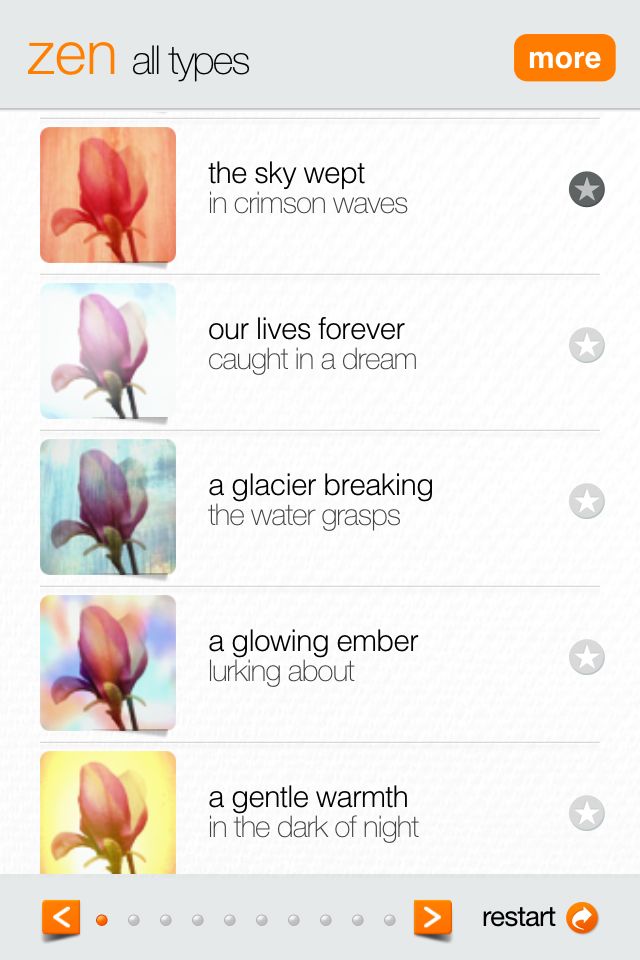
Let’s start at the beginning. You can either take a photo with the app or select one from your library. Once you select or take your photo you will have the opportunity to move and scale, cropping it to a square image. That’s where the fun begins. Do you like the original image (sans effects), a child’s shoes, when I felt sad, the sky wept, our lives forever, a glacier breaking, a glowing ember, a gentle warmth, it was never quite like that, or around 3 a.m.? No? Not a problem. Maybe you will like the smell of new fire, the feather light-softness, the wind… You’re beginning to get the picture. Count them…100 very cool filters with 100 very cool names. Read More→