
Archive for edit

OSXcellence – Shoebox Review

It is a given that most photographers who are Mac users will, at some point, use iPhoto to organise their images and perform simple edits. And whilst iPhoto is a polished product, it is by no means perfect. Shoebox, by KavaSoft, is a simple alternative to iPhoto, but is it realistic as a replacement?

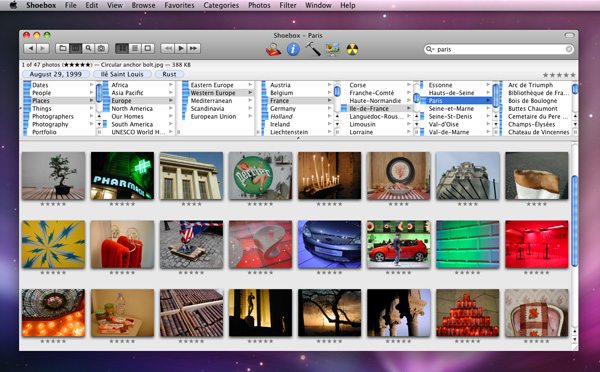
Shoebox isn’t stunning to look at, although controls aren’t cluttered and the app is very usable as a result. The simple nature of Shoebox also lends itself to quick processing, and indeed, Shoebox doesn’t suffer from slowdown.

Shoebox works differently from iPhoto; rather than creating its own library, to which images are imported, Shoebox simply scans folders on your Mac, and locates the images within these folders – thumbnail previews of the images are then displayed within Shoebox’s interface. By selecting images, you can add them to a category, give them a rating or change their name, as well as edit or view a plethora of other metadata.

One area in which iPhoto probably outperforms Shoebox is organisation. This is less to do with a lack of organisation features, and more to do with accessibility and ease of use of these features. Generally speaking, however, as an image sorter, Shoebox performs well and due to its minimal operation, it runs very fast. Despite having 4GB of RAM in my Mac, I still find iPhoto slowing-down from time to time, whereas Shoebox always seems to be snappy.

Like iPhoto, Shoebox has a slideshow feature. It isn’t as customisable as iPhoto, but as a way of displaying your pictures, it works fine. This is certainly an area where Shoebox can improve in future versions, however.
Read More→

OSXcellence – cf/x photo Review

I have reviewed a number of simple editing apps in this column, many of which are effects-based. But suppose you don’t want to make your picture look like a badly exposed polaroid, yet still would like the simple operation that apps like CameraBag 2 have? Today’s app is cf/x photo, which aims to fit just this description – but will it fill the niche?

I hadn’t heard of this app, or its makers – cf/x software – before stumbling upon photo in the Mac App Store. On initial inspection, photo seems to follow the trend of sleek and simple effects/edit apps. Unlike the standard formula in this genre, however, photo is not about messing around with your pictures (even though a few basic effects filters are included). The aim of this app is summed-up nicely by its makers: “CROP. TWEAK. ENJOY.” As a result, the focus in photo is practical functions, like cropping and watermarking. You can also create classy frames of any colour you desire, and put text onto the image as well.

The crop function includes a number of aspect ratios, as well as the ability to crop at an angle. Given that you have a Mac (on which photo runs), you automatically have iPhoto, which can perform these crop functions itself. The need for such a cropping function in photo, then, is somewhat lacking.

The effects palette is very modest in photo, and to be honest, you’d do better to download a free specialist app if you want to style your image (like Pixlr-o-matic). Hidden within this menu is access to basic exposure and colour editing tools, although again, iPhoto would probably do this job better.The frame options in photo, whilst being basic, are very useful, allowing the easy addition of a coloured border, with one or two-colour options available. The width of the frame is adjustable, but unfortunately, making the frame wider makes it encroach on your image more, rather than expand outwards – a disappointing feature.

Text can be added in one of three segments of the image – top, middle and bottom – although the text actually sits somewhere near the top of each of these segments. The placing of these is strange, and makes this tool useless in comparison to the Mac’s inbuilt app, Preview, in terms of annotation. Read More→

OSXcellence – Photo Sense for Mac Review

So you have a Mac? And you want to make your images look better? But you can’t be bothered to use iPhoto’s manual editing controls? And you want to use auto-enhancement on batch images? And you’re willing to pay two-thirds of the price of Photoshop Elements to get something that performs this function only (which, of course, Elements can do – a lot better)?

Well, whilst I would suggest that you are a fairly niche target market, the market that you represent is catered for (or so the makers, VeprIT, hope anyway) by Photo Sense for Mac.

The process of “improving” pictures with Photo Sense starts with adding images, which have their previews immediately “enhanced.” The options for processing include the standard exposure, contrast and saturation adjustment, as well as noise reduction and sharpening. In addition, effects can be added, although the extent to which you use most of those included very much hinges on “personal taste”.

By clicking on each individual image, you can manually adjust it, with the aid of a histogram and a split-screen before and after.

As with most auto-enhancers, the results of Photo Sense’s default processing are at best, “dramatic”, and at worst, disasters. Whilst the heady mix of over-sharpening, super-saturation and ridiculously boosted contrast can be attention grabbing, the thought of allowing these images into print fills me with dread.

Read More→