Archive for effects

Green Screen-Like Effects with VFX Studio IOS App

What do you do while you have a long wait in the airport? Angry Birds? Maybe. But what if you want to be a little more creative? Well, quickly download VFX Studio and have some fun. That’s what I did recently while waiting at Dallas Love Field for my flight back home.

The app is very easy to use. You simply select a photo from your camera roll or take a photo within the app. Once you do so, you simply select the “Tools” menu from the left side of the screen. From there you may select “Add Fx” to select the item you would like to add to your photo. Current selections include animals, blood, bones, bullet impacts, cracks, fire, light flare, lasers, lightning, makeup, scars, smoke, shadows, weather and weapons. Once you add the effect, you may place, size, rotate, or flip the effect. When you finish, you can flatten to merge the layers and save to your camera roll.

The app costs 99 cents and is worth it for lots of fun. But there is a serious use for it as well. While waiting in the airport I used the app to mark a location on a photo using the shadow tool. This is a fun app with some serious applications as well.

This is one you might want to check out. Because you never know when you might want to add a dinosaur to your Caribbean island theme. And I’ve found that it is much easier to use this app than it is to shoot a dinosaur in front of a green screen. Seriously. Have you ever tried it?

So download and have some fun with it.

All the best…Mike

OSXcellence – cf/x photo Review

I have reviewed a number of simple editing apps in this column, many of which are effects-based. But suppose you don’t want to make your picture look like a badly exposed polaroid, yet still would like the simple operation that apps like CameraBag 2 have? Today’s app is cf/x photo, which aims to fit just this description – but will it fill the niche?

I hadn’t heard of this app, or its makers – cf/x software – before stumbling upon photo in the Mac App Store. On initial inspection, photo seems to follow the trend of sleek and simple effects/edit apps. Unlike the standard formula in this genre, however, photo is not about messing around with your pictures (even though a few basic effects filters are included). The aim of this app is summed-up nicely by its makers: “CROP. TWEAK. ENJOY.” As a result, the focus in photo is practical functions, like cropping and watermarking. You can also create classy frames of any colour you desire, and put text onto the image as well.

The crop function includes a number of aspect ratios, as well as the ability to crop at an angle. Given that you have a Mac (on which photo runs), you automatically have iPhoto, which can perform these crop functions itself. The need for such a cropping function in photo, then, is somewhat lacking.

The effects palette is very modest in photo, and to be honest, you’d do better to download a free specialist app if you want to style your image (like Pixlr-o-matic). Hidden within this menu is access to basic exposure and colour editing tools, although again, iPhoto would probably do this job better.The frame options in photo, whilst being basic, are very useful, allowing the easy addition of a coloured border, with one or two-colour options available. The width of the frame is adjustable, but unfortunately, making the frame wider makes it encroach on your image more, rather than expand outwards – a disappointing feature.

Text can be added in one of three segments of the image – top, middle and bottom – although the text actually sits somewhere near the top of each of these segments. The placing of these is strange, and makes this tool useless in comparison to the Mac’s inbuilt app, Preview, in terms of annotation. Read More→

OSXcellence – Pixlr-o-matic

For some time now, I have admired and used Pixlr-o-matic for adding style to my images. Only now, however, can I feature it in this column, as a Mac version has recently been released.
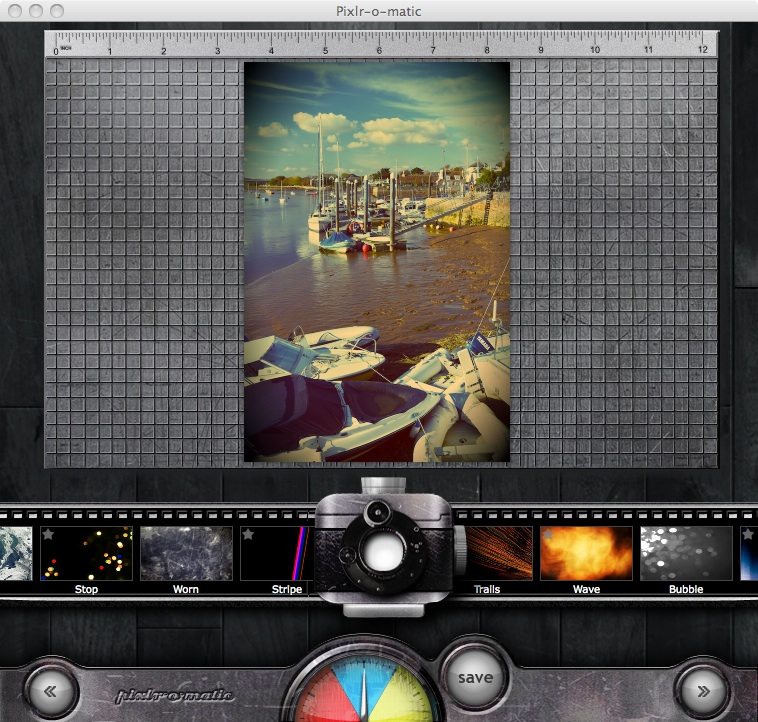
Pixlr-o-matic doesn’t have the largest range of styles; in fact, it has very few in comparison to other more popular filter apps. The reason I believe Pixlr-o-matic stands out from the crowd is due to the attractiveness, and careful selection, of the filters installed. As a result, when I want one-click stylising of an image, I rarely need to venture further than this app.

Pixlr-o-matic’s interface is very simple, with a live preview illustrating the current effects applied. Filters come on a “film-strip” which is dragged sideways to scroll through the options. The simplicity of this app’s system is refreshing, with a maximum of three effects applicable on any single image – a colour/exposure/sharpness layer, a texture/damage/artistic layer, and a frame layer. None is obligatory, and that’s a good thing, considering that most of the middle stage’s filters range from bizarre to ugly to pointless. The other two layers by themselves, however, provide truly stunning results which replicate great film effects of the past.

Read More→

OSXcellence – FX Photo Studio Pro Review

(O.K., O.K…. another effects app. But this one is different, I promise!)

I have reviewed a few effects apps for Mac in this series, and used many more. Some have been good, some limited, some very average. Having used FX Photo Studio Pro ($39.99/£27.99), however, I can say that anyone who purchases this app may never need another effects app again.

Extreme praise you may be thinking. But I think it is merited – FX Pro has raised the bar for stylising as far as I am concerned, not just because of the vast quantity of high quality filters it provides; nor just because you can add as many styles to an image as you like; nor is it because all the filters are highly adjustable. It is because of the app’s sleek, beautiful design, its stability, and its ease of use. It is fair to say that I prefer using this to iPhoto (though obviously FX Pro performs a different function).

Importing images is as straightforward as drag-and-drop, and images load at lightning speed, with a high quality preview.

Step one is to apply one or more effects. With 172 effects, given their quality, if you can’t find an effect to suit your picture amongst this selection, you’re not trying hard enough. What’s more, all of these effects are customisable, and I’m not just talking about a “strength” slider. One of the better examples is the very fine tilt-shift filter; the strength of blur, and the radius of the focus sweet spot are selectable, along with the actual placing of the sweet spot. The colour warping filters can be adjusted to include a smaller or larger colour target range, whilst even a 3D effect can be applied, with the degree of depth adjustable.

Using these effects is a great experience. All are accessible from the bar at the bottom, and can be located by category, by the search bar, or from your favourites list – yes, there is one for sorting the proverbial “wheat” effects, from the “chaff” ones.

Another killer feature here is the ability to save and recall presets; that is, the particular settings you have used for an effect, meaning even speedier effect application. The ability to see a “before and after” split-screen is another welcome bonus. Read More→

ScratchCam for iPhone: Random Film Effects

It has gone from being a weakness to a disease. I’m addicted to iPhone apps that provide cool, vintage effects for my photos. And the developer of ScratchCam, Steve Arnold, is feeding my addiction with a genuinely cool iPhone, iPod Touch and iPad app.

The simplicity is beautiful, and so are the images. So all you do is open the app, and either take a photo or select one from your camera roll. You then click on the refresh button until you find an effect you like. If you see one you like, you can click on the heart icon, which saves it as a favorite. When your image is ready to share with the world, you simply press the Share button to share it via Flickr, Facebook, Twitter, or email. You may also opt to save it to your camera roll for future use, which I recommend that you do even if you share it via one of the social networking sites.

This little jewel normally sells for $1.99 in the App Store. However, at the time of writing this review, it was on sale for 99 cents. You can try the lite version, which I downloaded for the review, for free. Read More→