Archive for iPhoto

OSXcellence – PhotoSweeper Review

I don’t know about you, but I often come back from photoshoots with a bucketload of pictures, which all need sorting through. And whilst the reams of metadata which Aperture would like you to fill in can be useful for re-finding pictures at a later date, sometimes you just want to sort your pictures in a simple but fast manner. This is the idea of PhotoSweeper – a lightweight image sorter.

The primary function of PhotoSweeper is the weeding-out of unwanted photos. The first step with PhotoSweeper is to select a folder, or library – of the Lightroom, iPhoto or Aperture variety – to sort through. PhotoSweeper rapidly loads previews of your images, and you’re ready to start sifting through the pictures.

The best function in PhotoSweeper is the duplication detection. A number of variables can be adjusted to locate duplicates, such as time between pictures or the size of the bitmaps sample (the area compared for similarities in each picture). In addition, you can define whether to compare in RGB or greyscale, whether to preprocess images with blur, and how sensitive you want the colour-matching to be. How closely images must match is also adjustable. Once the (potential) duplicates are found, you can view the sets of matching images either individually as a side-by-side comparison, or as a list, which includes all of the sets of duplicates. It is a system which allows very rapid ridding of duplicates to the “Box” – PhotoSweeper’s in-app temporary trash. From the “Box,” images may be deleted to the OSX Trash.

In addition to the duplicate search function, PhotoSweeper has a speedy file info function. By clicking on an image, you can view useful EXIF info such as the histogram, focal length and exposure settings. Other more mainstream apps have this feature, but none of them do it as quickly as PhotoSweeper. Read More→

OSXcellence – Xilisoft Photo SlideShow Maker Review

Most of us take photos of family, of our holidays, or big events, and these photos hold many memories, hence you want to share them. You upload them to Flickr or Facebook, you email them to your friends, and you might even get a few prints done for your Nan. But since the invention of the slide projector, no other way of exhibiting pictures has been as enthralling as a slideshow.

iPhoto, all-rounder that it is, has a fine slideshow builder, which is getting better with every edition of iLife. iPhoto’s effort, however, isn’t comprehensive, and so there is room for other apps to fill the void. Xilisoft Photo Slideshow Maker is one such app, but is it the offering you should invest in?

Xilisoft doesn’t trump iPhoto on looks – it’s a very ‘PC looking’ app. Looks, of course, aren’t everything, however, and Xilisoft is pretty slick at loading pictures. Once you’ve chosen the photos you want to use, Xilisoft provides a fairly simple route to slideshow. After arranging the order of your images, you can adjust the length of time each photo is displayed, and the transition length between photos, in milliseconds. You can also control which transition styles are used (although the possibilities in this area are rather limited when compared to iPhoto’s range), and whether you want a Ken Burns-style zooming effect.

Read More→

OSXcellence – Shoebox Review

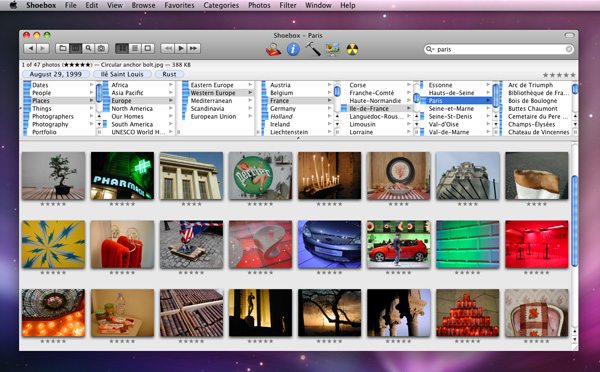
It is a given that most photographers who are Mac users will, at some point, use iPhoto to organise their images and perform simple edits. And whilst iPhoto is a polished product, it is by no means perfect. Shoebox, by KavaSoft, is a simple alternative to iPhoto, but is it realistic as a replacement?

Shoebox isn’t stunning to look at, although controls aren’t cluttered and the app is very usable as a result. The simple nature of Shoebox also lends itself to quick processing, and indeed, Shoebox doesn’t suffer from slowdown.

Shoebox works differently from iPhoto; rather than creating its own library, to which images are imported, Shoebox simply scans folders on your Mac, and locates the images within these folders – thumbnail previews of the images are then displayed within Shoebox’s interface. By selecting images, you can add them to a category, give them a rating or change their name, as well as edit or view a plethora of other metadata.

One area in which iPhoto probably outperforms Shoebox is organisation. This is less to do with a lack of organisation features, and more to do with accessibility and ease of use of these features. Generally speaking, however, as an image sorter, Shoebox performs well and due to its minimal operation, it runs very fast. Despite having 4GB of RAM in my Mac, I still find iPhoto slowing-down from time to time, whereas Shoebox always seems to be snappy.

Like iPhoto, Shoebox has a slideshow feature. It isn’t as customisable as iPhoto, but as a way of displaying your pictures, it works fine. This is certainly an area where Shoebox can improve in future versions, however.

Read More→

OSXcellence – Photo Sense for Mac Review

So you have a Mac? And you want to make your images look better? But you can’t be bothered to use iPhoto’s manual editing controls? And you want to use auto-enhancement on batch images? And you’re willing to pay two-thirds of the price of Photoshop Elements to get something that performs this function only (which, of course, Elements can do – a lot better)?

Well, whilst I would suggest that you are a fairly niche target market, the market that you represent is catered for (or so the makers, VeprIT, hope anyway) by Photo Sense for Mac.

The process of “improving” pictures with Photo Sense starts with adding images, which have their previews immediately “enhanced.” The options for processing include the standard exposure, contrast and saturation adjustment, as well as noise reduction and sharpening. In addition, effects can be added, although the extent to which you use most of those included very much hinges on “personal taste”.

By clicking on each individual image, you can manually adjust it, with the aid of a histogram and a split-screen before and after.

As with most auto-enhancers, the results of Photo Sense’s default processing are at best, “dramatic”, and at worst, disasters. Whilst the heady mix of over-sharpening, super-saturation and ridiculously boosted contrast can be attention grabbing, the thought of allowing these images into print fills me with dread.

Read More→

Eye-Fi Unveils New Geo X2 Wireless Memory Card, Exclusive to Apple

Eye-Fi LogoEye-Fi Geo X2 Uploads Geotagged Photos and Videos to iPhoto and MobileMe via Wi-Fi

May 10, 2010 – PRESS SUMMARY – Eye-Fi Inc. announced the launch of the Eye-Fi Geo X2, a Wi-Fi enabled memory card that seamlessly integrates with Macintosh computers, iPhoto and MobileMe. The Eye-Fi Geo X2 will be on sale in May, exclusively in Apple Stores in the U.S. and internationally for $69.99 USD.

Eye-Fi Geo X2 4GB + Wi-Fi CardAs part of the new “X2” family announced last month, the 4GB Eye-Fi Geo X2 offers faster-than-ever wireless photo and video uploads through an 802.11n transmitter, improved performance with Class 6 read/write speeds, lifetime Geotagging service and virtually endless storage capacity with Endless Memory mode.

“We’ve had an overwhelmingly positive response to our new X2 line and the improved experience it’s brought our users,” said Jef Holove, CEO of Eye-Fi. “Now we’re bringing the Eye-Fi Geo X2 exclusively to Apple so that their users can effortlessly upload photos and videos for seamless editing and sharing with iPhoto and MobileMe.”

With the new Eye-Fi Geo X2, Macintosh computer users can wirelessly back-up both photos and videos directly into iPhoto or any folder of their choice on their computer. The Wi-Fi enabled memory card can also automatically upload photos and videos directly to MobileMe or one of more than 25 sharing sites like Facebook, Flickr, Picasa or YouTube. With Endless Memory mode, the Eye-Fi Geo X2 can also automatically make space available on the memory card after photos and videos have been safely uploaded to the computer or Web. Read More→