
Archive for Photoshop – Page 9

Adobe Updates Camera RAW to 5.6 and Lightroom to 2.6

ADOBE-LOGODec 20, 2009

Adobe updated Camera RAW to version 5.6 and Lightroom to version 2.6 this week. They now have support for 20 new camera models including the Canon 1D Mark IV, 7D, PowerShot G11 and the PowerShot S90.  The Nikon D3s, Olympus E-P2, Pentax K-x and Sony’s most recent Alphas are also supported. Check out Adobe’s download page to see if your new camera was added to the upgrade.

Adobe Introduced Photoshop.com Mobile for iPhone

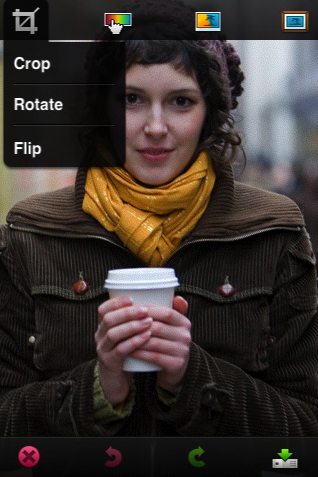
ADOBE-LOGOPHOTOSHOP-MOBILE-SCREENOct 11, 2009 – Adobe introduced their Photoshop.com Mobile iPhone app this week. Using gesture-based editing it’s now easy to crop, rotate and flip your images while viewing them with full-screen previews. You can correct color with saturation and tint adjustments, enhancing the exposure and vibrancy and even convert images to black and white. Add special effects to your photos with the Sketch tool, Soft Focus, Warm Vintage, Vignette and Pop tools. All edits are non-destructive so edits or changes can be undone or redone without losing your original photo.

After you’re done editing you can upload the images to your free Photoshop.com account for photo sharing and data back-up saving valuable space on your iPhone. Photoshop.com gives you 2GB of free storage that is equal to over 1,500 photos. Once stored you can access them from any internet-connected computer and you can view your entire library of images through the iPhone app. Photoshop.com Mobile is a free download from the iTunes Store and is compatible with the iPhone and iPod Touch.

PHOTOSHOP-COM-LOGO

Read More→

Topaz ReMask for Fast and Accurate Masking

TOPAZ-LABS-LOGOTOPAZ-REMASK-BOXOct 11, 2009 – Topaz Labs announced the release of Topaz ReMask, a fast and highly efficient Photoshop plug-in for masking and cutting out digital images. Using a tri-map or user-generated mask-map made up of three tones, white, black and gray, users are able to quickly define the elements in their image that they want to keep using white; elements they want to get rid of using black; and elements that they want ReMask to figure out using gray. The tri-map technique significantly reduces masking times while increasing the cutting accuracy of delicate and complex images elements such as hair and fur.

If you’re looking for a quicker and more accurate way to extract objects in your digital images, try Topaz ReMask free for 30 days and if you like it, it’s $69.99 to buy. Read More→

onOne Software's Photo Essentials 3 for Photoshop Elements 8

onone-logoOct 11, 2009 – onOne Software announced Photo Essentials 3 for Adobe Photoshop Elements 8. This collection of five tools painlessly corrects color, removes unwanted backgrounds, adds photographic effects and enlarges photos to help you get the job done quickly and easily. Photo Essentials 3 is available now for $69.99 and if you purchased Photo Essentials 2 on or after September 24, 2009 you’ll receive an upgrade to version 3 as an electronic download for free. Read More→

Adobe Creative Suite 4 Unleashed – Seminar Tour

KELBY-TRAINING-LIVE-LOGOSep 27, 2009 – KelbyTraining LIVE launched their brand new “Adobe Creative Suite 4 Unleashed” seminar tour. These one-day seminars feature NAPP and Adobe Certified Instructors Dave Cross and Rafael Concepcion and will cover using the full Creative Suite to “Unleash” your creativity while dramatically boosting your productivity. The entire full day of training is only $49 or $39 for NAPP members and includes a free Adobe CS4 Suite Integration DVD by Dave Cross. The first seminar debuts in Miami on Oct. 7th at the Miami Beach Convention Center. Check out KelbyTrainingLIVE.com for registration info and a full schedule of their events. Read More→

Adobe Updates Photoshop Elements and Premiere Elements

PS-PREMIERE-ELEMENTS-8-BUNDLEADOBE-LOGOSep 27, 2009 – Adobe announced an update to their entry-level photo editing program Photoshop Elements to version 8. This is a great program for the photographer just getting started with editing their digital photos. Some of the new features include Photomerge® Exposure which creates perfectly lit photos by combining multiple shots of the same scene with just a few simple clicks. The Recompose feature allows the user to automatically resize photos without distorting the important parts and Quick Fix previews allow users to visually choose the best color, contrast and lighting adjustments from a series of previews. Mac users will have access to a few additional tools like Photomerge Scene Cleaner for brushing away unwanted elements in the image, Smart Brush for applying effects to a specific area of a photo and Touch-Up Brushes for common editing tasks like whitening teeth or making bright blue skies. Photoshop Elements 8 for Windows is available now from Adobe.com for $99 and will be available for Mac in October for $99.

If you’re into video and have a Windows computer you may want to check out Adobe’s Photoshop Elements 8 and Premiere Elements 8 bundle. You’ll have all the great photo editing features from Photoshop Elements plus the ability to easily edit your videos. Some new features added to the Premiere update include Smart Fix which automatically fixes shaky footage and color and lighting problems. Smart Trim identifies and helps get rid of the least interesting, lowest quality footage. Smart Mix seamlessly balances audio to give your video professional-quality sound throughout. Motion-tracking gives users the power to add graphics, text and effects such as thought bubbles and motion blur that will automatically follow a subject within a scene. The bundle is available now at Adobe’s website for $149.99 and will be hitting retail outlets soon. Premiere Elements 8 for Windows can also be purchased separately for $99. Read More→