Archive for slideshow

OSXcellence – Xilisoft Photo SlideShow Maker Review

Most of us take photos of family, of our holidays, or big events, and these photos hold many memories, hence you want to share them. You upload them to Flickr or Facebook, you email them to your friends, and you might even get a few prints done for your Nan. But since the invention of the slide projector, no other way of exhibiting pictures has been as enthralling as a slideshow.

iPhoto, all-rounder that it is, has a fine slideshow builder, which is getting better with every edition of iLife. iPhoto’s effort, however, isn’t comprehensive, and so there is room for other apps to fill the void. Xilisoft Photo Slideshow Maker is one such app, but is it the offering you should invest in?

Xilisoft doesn’t trump iPhoto on looks – it’s a very ‘PC looking’ app. Looks, of course, aren’t everything, however, and Xilisoft is pretty slick at loading pictures. Once you’ve chosen the photos you want to use, Xilisoft provides a fairly simple route to slideshow. After arranging the order of your images, you can adjust the length of time each photo is displayed, and the transition length between photos, in milliseconds. You can also control which transition styles are used (although the possibilities in this area are rather limited when compared to iPhoto’s range), and whether you want a Ken Burns-style zooming effect.

Read More→

OSXcellence – PhotoPresenter 4 Review

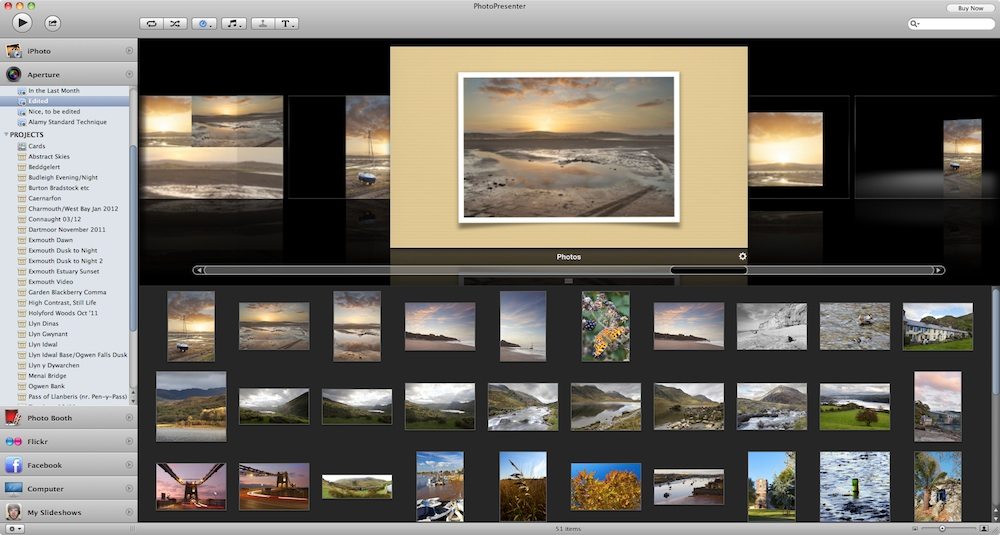
Photos look great on paper, but if you need to display your images on-screen, or using a projector, you’re going to need an app that will showcase your photos beautifully. In a previous article, I reviewed ePic (a basic slideshow app for showing off pictures) and found that whilst it was fine for creating a slideshow, to show to your friends and family, on your Mac, it wasn’t great for heavyweight photographic slideshows, not least because it lacks an export option. Boinx, the well-established software company most famous for animation app iStopMotion, has its own entrant into the slideshow market – PhotoPresenter 4 – but will this app be the answer to your slideshow requirements?

With PhotoPresenter 4, Boinx have gone for a well-balanced mix of the simple, yet powerful. Creating a great looking slideshow in this app is very easy if you want to simplify things; you can choose a folder or album in iPhoto, Aperture, Photo Booth or Flickr (or anywhere else on your Mac), and then choose a theme, at which point, you’re ready to play.

PhotoPresenter 4 has hidden depths, however. All of the slideshow styles or “themes” are customisable, with different frames and backgrounds available, and the ability to add captions and titles. You can also add music to any slideshow, and change the speed at which the images are played, including the option of syncing to the length of a music track.

Despite the high quality of the themes included in PhotoPresenter, some aren’t particularly usable for anything other than a screensaver. The zooming “Ken Burns” theme, for example, is almost unusable with certain image aspect ratios, whilst the “Wall” theme provides only a partial view of any picture at any time. Having said this, themes such as “Book” (a virtual photo album) and “Carousel” provide a classy and beautiful background to your images. Whether the handful of really good themes is enough to get you to purchase PhotoPresenter 4 is up to each individual’s judgement.

Read More→

Animoto Now Smarter, Easier and Faster with New Creation Flow

October 7, 2011 – PRESS SUMMARY – Animoto, the maker of the innovative and award-winning online video creation service, announced an all-new, smarter video creation flow that makes it even easier to quickly produce pro-quality videos from photos, video clips and music. The company also added a new video slideshow style to its library, called Vintage Voyage, which lets anyone produce videos with an antique, old-world feel.

The new Animoto creation process has been redesigned from the ground up to accelerate the creation of video slideshows. The new setup allows the creation of a video in as few as five clicks. Another benefit of the new creation flow is an expandable workspace that can display up to 300 thumbnail photos at a time — making it easier to create longer videos. Editing is also easier with full-size image previews, and the ability to preview text from within thumbnails.

Vintage Voyage, Animoto’s 26th video style, is ideal for everything from creating an artistic trip down memory lane, to showcasing a rustic trip to Europe.

To get started, users create and share their own 30-second Animoto video for free. For unlimited full-length videos, a monthly subscription to Animoto Plus is available for $5, or users can choose an annual subscription for $30. Another option, Animoto Pro is available for $39 a month, or $249 for an annual subscription, and is ideal for businesses, including professional photographers.

–

KODAK Gallery Partners with Animoto for Video Slideshows

Kodak Logo

August 25, 2011 – PRESS SUMMARY – KODAK Gallery, has partnered with Animoto, the maker of the innovative and award-winning online video creation service, to make sharing photo memories at KODAK Gallery more compelling and fun with video slideshows.

The partnership enables KODAK Gallery customers to easily create professional-quality video slideshows from their photos in just a few clicks. KODAK Gallery members simply choose a photo album, select a song, and a video slideshow with transition effects is generated for them. And, for a limited time, customers can log on to kodakgallery.com and receive their first full-length mobile-quality video slideshow for free.

“We’re continually striving to provide fun, easy, and creative ways for our customers to share their photo memories with friends and family, and video slideshows do just that,” said Victor Cho, General Manager of KODAK Gallery, Eastman Kodak Company. “We’re excited to be the first partner to use the new Animoto platform and provide Gallery members with professional quality video slideshows that are super easy to create and share.”

Video slideshows are a great way to showcase the photo memories from a birthday party, wedding, vacation, or other memorable event. KODAK Gallery members can easily share their video slideshows with friends by email, posting a link on their Facebook wall, sending a private message through FACEBOOK, or by downloading the video and burning it to a DVD. Read More→

Animoto Completes $25 Million Financing

June 30, 2011 – PRESS SUMMARY – Animoto (www.animoto.com), the online video creation service, announced it has completed a $25 million financing led by Spectrum Equity Investors and with participation from existing Animoto investors Madrona Venture Group and Amazon.com. The new funding will allow Animoto to expand its innovative online video creation service which enables consumers, professionals and businesses to create and share professional-quality videos. The company has grown to over 3 million registered users and 100,000 paying subscribers in more than 150 countries worldwide.

“We’ve only just begun to realize the full potential of our original vision for the technology and product,” said Brad Jefferson, CEO and co-founder of Animoto. “With our rapidly growing and highly engaged user base, Animoto is uniquely positioned to capitalize on the rapid onvergence of photos, videos, mobile and the digital living room. We are pleased to be partnering with Spectrum as we enter our next phase of growth.”

As part of the announcement, Ben Spero, Managing Director for Spectrum Equity Investors, will be joining the Animoto Board of Directors. He also serves on the Boards of Spectrum’s portfolio companies Ancestry.com, SeamlessWeb, and SurveyMonkey. Read More→

2011 WPPI Coverage – Animoto

I had the chance to meet with Erik Bjornard, VP Marketing for Animoto.com, at the 2011 WPPI Trade show and Convention, to talk about their new high-speed video rendering engines and HD video capabilities.

For those of you that have never heard of Animoto before, they are a video creation Web site that lets photographers quickly and easily create professional-quality videos from their photos and video clips. Animoto has partnered with White House Custom Colour, ProSelect and SmugMug to take advantage of their platforms and make it easier to send your images from where they are stored to create your Animoto projects.

If you haven’t already be sure to check out Animoto.com and the services they offer. This is a great platform to help you extent your client offerings and create some amazing videos with minimal effort.

–