
Archive for News and Reviews – Page 4

OSXcellence – SnapHeal 2.0 Review

The original version of MacPhun’s SnapHeal app was focused purely on cloning and healing, and whilst it was a polished product, I didn’t see why Photoshop owners would want or need it. MacPhun is now releasing version 2.0, complete with new features and better processing. But do the upgrades take SnapHeal from Photoshop wannabe to Photoshop rival?

(Note: rather than reviewing 2.0 as a new app, this article will be commenting on the improvements MacPhun have added to the new version. If you’d like more information about SnapHeal, please read my original review)

Almost every part of SnapHeal has been upgraded, re-beautified or added to with new features, although many areas of change have been altered subtly or under the hood. The most noticeable non-UI change is in the area that matters most – image editing performance. Whereas previously SnapHeal was no better than Photoshop’s healing tool at cloning large areas, quite large areas can now be filled adequately using the Shapeshift function. No image editor (at present) will do a good job at removing large objects from a picture, regardless of which settings you use, but I would say that SnapHeal produces some of the most realistic cloning I’ve seen in any image editor. Having tested its abilities to remove driftwood from an image of a pebbly beach – a nightmare background for cloning – Snapheal produced a result good enough for any online use, if not for printing. That said, this isn’t cloning by hand, this is automatic, draw-a-rough-shape-and-go cloning, which makes the results very impressive. For those who want to spend time making their images pixel-perfect, SnapHeal’s brush tool is as good as anything Photoshop has to offer. As an added bonus, my tests would suggest that the new SnapHeal is quicker at processing than its predecessor.

SnapHeal 2.0 has also added full image adjustment. Happily, somewhat advanced controls such as highlights/shadows, hue and temperature adjustments are included, pushing SnapHeal into the complete image editor genre. SnapHeal’s all-rounder credentials are boosted further with the addition of a crop and resizing tool. Read More→

Apple Introduces the iPhone 5

After much speculation, rumors and leaked photos, Apple finally announced the new iPhone 5 on Wednesday, September 12, 2012. Those following the chatter online probably weren’t surprised by much.

The increased height shown in the leaked photos was right on. That extra real estate allows for a larger 4″ diagonal screen that is closer to the 16:9 widescreen format we’re all used to. Of course Apple is using their Retina display with a resolution of 1136×640 pixels at 326 ppi.

The iPhone 5 is also thinner and lighter than the previous iPhone 4S which made fitting all of the components in the body more challenging. The new radio chip and A6 processor were redesigned to be smaller to fit in this compact area and Apple claims the battery life is equal to or greater than the 4S.

Taking advantage of the new LTE mobile networks and dual-band WiFi, data download speeds are faster than ever. LTE could see download speeds up to 100 Mbps and the dual-band WiFi up to 150 Mbps. For many internet users, these speeds are faster than their home networks.

Since we’re all photographers here, let’s talk about the cameras. The iPhone 5 has two, an 8MP rear facing camera and 1.2MP front facing camera. The front camera can be used to shoot photos and 720p HD video up to 30 frames per second. The rear will shoot 1080p HD video up to 30 frames per second and the iPhone 5’s improved video stabilization will help to prevent shaky footage. Read More→

PhotoPlus Expo 2012 Special Events

PhotoPlus Expo 2012 is just around the corner and runs October 24-27th. Every year they put together some fun events and activities and this year is now exception. Check out the press summary below and mark your calendar for some photography fun.

September 14, 2012 – PRESS SUMMARY – PDN PhotoPlus International Conference + Expo announced a series of special events that will take place during the PhotoPlus Expo from October 24-27, 2012.  The events will provide attendees with additional insights including a sneak peek at some the new products and technologies on display; an opportunity to have their portfolio reviewed by several industry icons; and a special screening of a lynda.com documentary film about the life and work of husband-and-wife artists Jerry Uelsmann and Maggie Taylor.

Test Drive Rally and Tweet-Up

PDN PhotoPlus Expo will host its second annual Test Drive Rally and Tweet-Up Product Preview event on Wednesday evening, October 24, from 6:00 p.m. to 8:00 p.m. at the Javits Convention Center (Lower Level).  The Test Drive Rally and Tweet-Up will provide media and conference and expo attendees with a sneak peek of products, services, and technologies on display during the PhotoPlus Expo, which opens on Thursday morning, October 25.

The event will include a series of live Twitter boards where attendees can send tweets and photos to their followers about some of the interesting products they see during the Test Drive Rally.  The live Twitter boards will also allow attendees to communicate with each other and share their thoughts and observations, in real time.

Admission to the PhotoPlus Expo Test Drive Rally and Tweet-Up is free to anyone who presents an official PhotoPlus Attendee or Media badge.  Anyone can register for free at PhotoPlusExpo.com.

Read More→

OSXcellence – Snap Art 3 Review

Since the dawn of time – well, of Photoshop, anyway – photographers have taken pictures, loaded them into their photo editor, and then seen the tempting “art” filters, only to be disappointed by them time and time again. As a result, what should be a good idea – artifying photographs – has been a technique to avoid at all costs. Alien Skin’s Snap Art 3 is a plug-in for Photoshop, Elements and Lightroom, which attempts to deliver a better in-computer art experience to photographers. But is it a Caravaggio, or more of a crayon?

Snap Art 3 is accessed via the filters menu, but upon activation, it springs up in a new window of its own. Unlike Photoshop’s built-in art filters, Snap Art 3 comes with a plethora of realistic options. First, you choose your favoured real-world method of putting an image on canvas. Options include pastels, watercolours and pen and ink. Each style has its own set of variables, such as paint thickness, brush stroke length and brush size. The results are very realistic and, to add a unique twist to every picture, Snap Art 3 includes a 4-digit randomisation system, which means the texture of the “canvas” can be one of 9,999 subtle variations.

Once you’ve chosen your style, you then have the option to adjust it selectively, using Snap Art 3’s in-built layer mask system. Unfortunately, this does not include adjustments such as colour or exposure, but it does allow you to change photorealism and brush effects on an area of the image, perhaps increasing the apparent realism of the artwork. Snap Art 3 does, however, include the ability to make standard adjustments to the whole artwork.

Read More→

Discover the World From Your IOS Device with Trover

I love looking at photos. Places, people, still life, abstract…I enjoy seeing how others see  the world through their camera lens. Perhaps that’s why I enjoy Instagram so much. Where else can you discover the world from the comfort of your own home? That’s why I also like Trover.

With Trover, you can discover new places everyday, and post your favorite photos from the places you have been. I am just discovering this great app, but have had a good time seeing new places and recognizing photos from places that I have been.

When you post a photo, or a discovery as they call it, you may do so either by taking it from your camera or choosing from your photo library. For instance, the photo at right is one that I took out my window at the Grove Park Inn in Asheville, NC. I was able to select the location from a list. Had my location not been listed, I could have added my own. You may also add details, tips or tags to help others enjoy your discovery. You are then taken to a screen where you may post your discovery to Twitter, Facebook, or Tumblr. Once you do that, the photo is posted on Trover for others to see.

The main menu includes the following items: Home, Your Feed, Post a Discovery, Notifications, and Invites & Settings. At the home button, you will see the Newsfeed, Friend’s Discoveries, Nearby Discoveries, What’s Hot, What’s New, Featured Discoveries, Featured Trovers, Featured Lists, Places, and Search. There is so much to discover in this app that you will find so many new places that you will want to visit. Read More→

Profoto Introduces New Pro-B4 1000 Air Battery Generator

August 31, 2012 – PRESS SUMMARY – Profoto, the world’s leading manufacturer of lighting solutions for still and motion photography, announces the sturdy new Pro-B4 1000 Air battery generator, featuring ground-breaking flash duration.
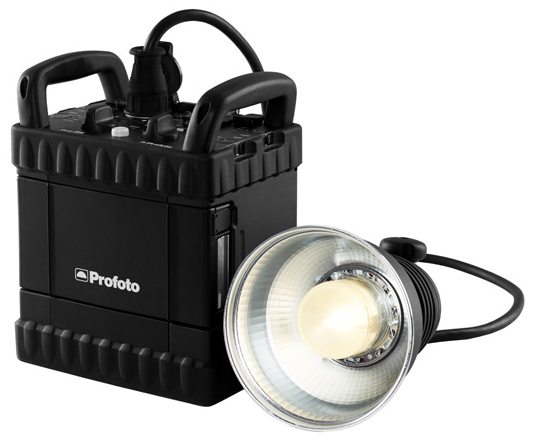
Thanks to the new, patent pending Hybrid Capacitor Technology, the Pro-B4 delivers flash durations down to 1/25,000 of a second – making it not only the shortest flash duration of any battery generator in the world, but also of any flash pack.

In addition to its short flash duration, the Pro-B4 is also the world’s fastest recycling battery generator. At lower power settings it is capable of firing up to 30 flashes per second, while the longest wait on full power is less than a second. Read More→