
Archive for News and Reviews – Page 5

OSXcellence – PhotoSweeper Review

I don’t know about you, but I often come back from photoshoots with a bucketload of pictures, which all need sorting through. And whilst the reams of metadata which Aperture would like you to fill in can be useful for re-finding pictures at a later date, sometimes you just want to sort your pictures in a simple but fast manner. This is the idea of PhotoSweeper – a lightweight image sorter.

The primary function of PhotoSweeper is the weeding-out of unwanted photos. The first step with PhotoSweeper is to select a folder, or library – of the Lightroom, iPhoto or Aperture variety – to sort through. PhotoSweeper rapidly loads previews of your images, and you’re ready to start sifting through the pictures.

The best function in PhotoSweeper is the duplication detection. A number of variables can be adjusted to locate duplicates, such as time between pictures or the size of the bitmaps sample (the area compared for similarities in each picture). In addition, you can define whether to compare in RGB or greyscale, whether to preprocess images with blur, and how sensitive you want the colour-matching to be. How closely images must match is also adjustable. Once the (potential) duplicates are found, you can view the sets of matching images either individually as a side-by-side comparison, or as a list, which includes all of the sets of duplicates. It is a system which allows very rapid ridding of duplicates to the “Box” – PhotoSweeper’s in-app temporary trash. From the “Box,” images may be deleted to the OSX Trash.

In addition to the duplicate search function, PhotoSweeper has a speedy file info function. By clicking on an image, you can view useful EXIF info such as the histogram, focal length and exposure settings. Other more mainstream apps have this feature, but none of them do it as quickly as PhotoSweeper. Read More→

The PENTAX X-5 Digital Camera

PENTAX LogoAugust 29, 2012 – PRESS SUMMARY – PENTAX announced the introduction of its PENTAX X-5 digital camera, an ideal choice for photographers who want to easily capture beautiful, high-quality images of a wide variety of subjects and scenes. Featuring a powerful high-magnification optical 26X super-telephoto zoom lens, the new PENTAX X-5 provides photographers with a focal length of 4mm-104mm (22.3mm ultra-wide angle to 580mm super telephoto 35mm equivalent). Coupled with the camera’s Macro mode, which allows photographers to capture dramatic close-up images of subjects as near to the lens as 0.4 inches, the X-5 delivers an extensive range of creative photographic possibilities.

And for effortless image composition and image playback, the PENTAX X-5 also features a large tiltable 3.0-inch, high-definition LCD screen that offers sharp image viewing, even in bright sunlight, while allowing users to shoot from high and low angles to keep the subject neatly framed in the image area. By combining a state-of-the-art image processing engine and back-illuminated CMOS image sensor with low-noise, even up to ISO 6400, and approximately 16.0 effective megapixels, the PENTAX X-5 provides users with very high-resolution images. Read More→

Turn Your Photo Into a Work of Art with ArtinPhoto IOS App

So much of what we see in the “New and Noteworthy” in iTunes seems to be more of the same. So it’s nice to run across something unique in the App Store. Such is the case for the ArtinPhoto IOS app. This 99 cent app allows you to add a black and white sketch within your existing photo or photo taken from your IOS device. There is a free, ad-supported version also.

It’s very easy to use and, aside from the annoying photos of random hands that hold many of the available frames, it produces some very nice results. You simply choose or take a photo. Make your selection of sketch frame, sketch type, and sketch brush. Press the “Play” button, and the app does all the work for you. You can then save your photo or share it via email. Read More→

The New Pro Plus Flash Heads from Profoto

August 28, 2012 – PRESS SUMMARY – Profoto, the world’s leading manufacturer of lighting solutions for still and motion photography, announces the new Pro Plus line of flash heads.
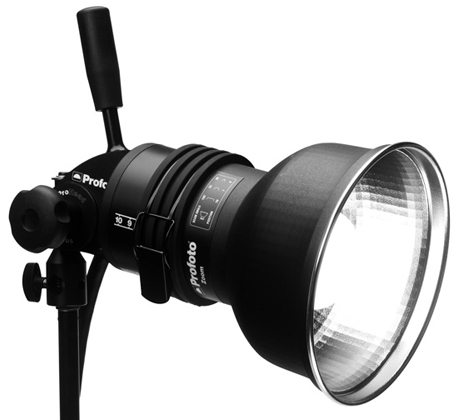
Compatible with over 120 different Profoto Light Shaping Tools and accessories, Pro Head Plus and Pro-B Head Plus have the following four upgrades: Read More→

OSXcellence – AKVIS Magnifier Review

Upsizing, with current technology, is one of the thorniest tasks you can perform on an image. Photoshop can upsize your image to a limited degree without loss of too much quality, but there are numerous other specialised apps which have tried (and many have failed) to improve on Adobe’s upsizing formula. One of them, PhotoZoom Pro 4, I have already reviewed, but this review is dedicated to a competitor – AKVIS Magnifier.

AKVIS isn’t hugely pretty, but the layout of the controls within the app is sensible and clear. Your opened picture is displayed on the left, while the upsizing and adjustment tools are in a column on the right (think Lightroom). You can have one of two set-ups – express or advanced. The express set-up reduces the displayed controls to size/ppi and edge sharpness/artefact removal, whilst the advanced set-up adds sliders controlling grain, ”simplicity” (how much you want to smooth out pixelation) and edge smoothness. In the advanced set-up, there is also the option to use Unsharp Mask, but, to be honest, the last time you’d want to be sharpening your image is when you’ve just upsized it – if you use this control, watch out for jagged edges coming at you from out of the screen.

By using AKVIS’ presets, and then applying little tweaks to the controls here and there, you can get quite a usable picture, even when you upscale by 500%. Don’t get me wrong – the quality is significantly degraded, and I don’t recommend you try this stunt. For something to hang on your wall, however, the picture AKVIS produces is probably acceptable. Read More→

MagicHour IOS App: Awesome FX with Ease

If you have kept up with many of my reviews you probably know that I really like vintage effects. And I have reviewed a large number of apps that provide effects. When I had almost given up on finding something new and different, I ran across MagicHour.

While I can’t say that there is anything earth-shattering about the filters in MagicHour, I simply like the way it works. Like most of the others, you may either take a photo within the app or use a photo from your camera roll. Once you select a photo (this is one I took this afternoon as a storm blew through), you go to a screen where you can move, scale, flip or rotate your photo within a square frame. Once you finalize that step you are taken to the filter section.

Here’s the neat part. You may select from lots of filters under categories of “Favorites”, “Preset”, “My Filters”, and “Download”. Not only can you use filters that are included in the app, you may also create your own filter sets and download filters from The Filter Market. Okay, so they give you a cheap app and get your dough by charging you for all the good filters? No! The Filter Market is free, as is the “Create Your Own Filter”. Let’s take a look at that feature. Read More→