Archive for Computers & Software – Page 3

OSXcellence – JPEGmini Lite

I imagine many of you reading this review take quite a lot of pictures. Some of you will upload your pictures to Flickr or Facebook, but many of you will have your own website. And some of you with some technical nous may prefer to self-host and will be aware of the limitations on storage space web hosts often impose. This means that the number of high quality images you can upload to your website can be severely limited. JPEGmini is a service which is likely to relieve these pains, and now, it comes in a Mac flavour. Or should I say two Mac flavours, Lite and Full; today, I’m looking at the Lite version.

The premise of JPEGmini is pretty simple – to reduce the file size of jpegs. The service has been going a while now, online, and doesn’t seem that revolutionary on paper. Only when you look at the results, however, will you see what the fuss is about. In many cases, JPEGmini can reduce the file size of an image by 4 times, yet there are no visible signs of image degradation. A few examples can be seen on JPEGmini’s home page. Whilst JPEGmini’s website does a fine job, it does require a process of upload, wait for processing, then download – the app version bypasses this hassle, and, as a result, is far more convenient. Today, I’m looking at the Lite version. The difference between Lite and Full is that Lite restricts the number of images you can process to 20 per day. Both versions, however, have the ability to take jpegs up to 17MP in size (a.k.a. MASSIVE). Read More→

OSXcellence – DoubleTake Review

Aren’t panoramas dramatic? I think so, certainly, and given the number of images which I see online that are as wide as a bus, there are plenty of other photographers out there who like the format. Panoramic images do come with a down-side, however – you have to spend hours stitching them together. Photoshop does a reasonable job, but what about if you want a simple, quick stitch? This is the niche which the app DoubleTake is aiming to fill.

Echoone, DoubleTake’s developer, claims that this app is the “nano” of its genre, and DoubleTake lives up to that billing. Open the app, drag-and-drop in your images, and you’re ready to stitch. DoubleTake’s automatic detection of stitch-lines isn’t great, but manual positioning is quite effective. In addition to mouse-based manoeuvring, images can be adjusted in terms of rotation, tilt, direction and scale, with sliders.

Additionally, the overall image can be adjusted with the standard forms of adjustment – brightness, saturation, etc.

One helpful feature that comes with DoubleTake is the ability to create 360º stitches. For a quick and easy 360º, DoubleTake works well enough, although I would recommend looking at specialist software if you’re going to work with 360s regularly. Read More→

OSXcellence – Xilisoft Photo SlideShow Maker Review

Most of us take photos of family, of our holidays, or big events, and these photos hold many memories, hence you want to share them. You upload them to Flickr or Facebook, you email them to your friends, and you might even get a few prints done for your Nan. But since the invention of the slide projector, no other way of exhibiting pictures has been as enthralling as a slideshow.

iPhoto, all-rounder that it is, has a fine slideshow builder, which is getting better with every edition of iLife. iPhoto’s effort, however, isn’t comprehensive, and so there is room for other apps to fill the void. Xilisoft Photo Slideshow Maker is one such app, but is it the offering you should invest in?

Xilisoft doesn’t trump iPhoto on looks – it’s a very ‘PC looking’ app. Looks, of course, aren’t everything, however, and Xilisoft is pretty slick at loading pictures. Once you’ve chosen the photos you want to use, Xilisoft provides a fairly simple route to slideshow. After arranging the order of your images, you can adjust the length of time each photo is displayed, and the transition length between photos, in milliseconds. You can also control which transition styles are used (although the possibilities in this area are rather limited when compared to iPhoto’s range), and whether you want a Ken Burns-style zooming effect.

Read More→

OSXcellence – Photora Review

When you take a photo, what do you do with it? I imagine you upload to your Mac, tweak it in iPhoto/Aperture/Lightroom/Photoshop, and then share it in some way – either digitally or in print. Most of the time, however, you will share images digitally. But what happens when you prepare your images for sharing online? You’ll no doubt resize them, and many photographers like to protect their images with a watermark. It is these two functions that Photora aims to make simple and easy, but is it just an unnecessary step in your workflow?

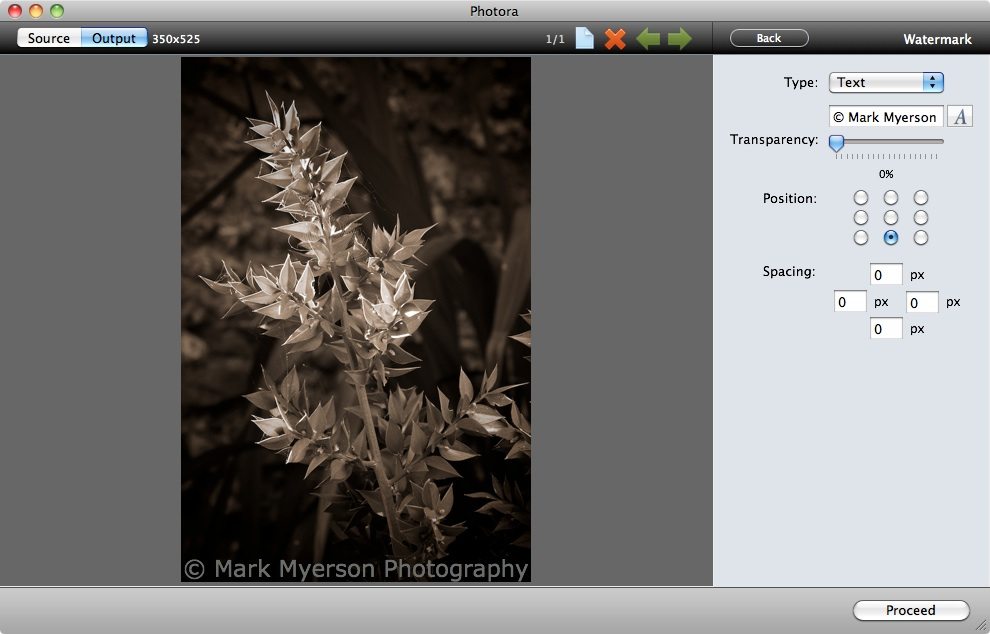
Photora keeps things simple; images are easily inputted via drag-and-drop, and then a minimal palette of clear controls awaits you. These are resize, watermark (both of which may be turned on and off) and file type selection.

The resize function is controlled either by percentage of original size, or by fixed width, height or size. The watermarking function is also simple, but it gets the job done. Watermarks can be text or images, and their transparency is adjustable. You can centre your watermark in one of nine positions (top-left, top, top-right, middle-left etc). The opportunity to adjust the precise location of your watermark is provided by optional spacing.

Read More→

OSXcellence – Shoebox Review

It is a given that most photographers who are Mac users will, at some point, use iPhoto to organise their images and perform simple edits. And whilst iPhoto is a polished product, it is by no means perfect. Shoebox, by KavaSoft, is a simple alternative to iPhoto, but is it realistic as a replacement?

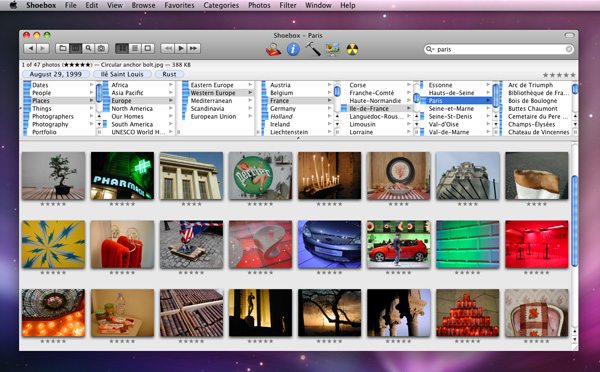
Shoebox isn’t stunning to look at, although controls aren’t cluttered and the app is very usable as a result. The simple nature of Shoebox also lends itself to quick processing, and indeed, Shoebox doesn’t suffer from slowdown.

Shoebox works differently from iPhoto; rather than creating its own library, to which images are imported, Shoebox simply scans folders on your Mac, and locates the images within these folders – thumbnail previews of the images are then displayed within Shoebox’s interface. By selecting images, you can add them to a category, give them a rating or change their name, as well as edit or view a plethora of other metadata.

One area in which iPhoto probably outperforms Shoebox is organisation. This is less to do with a lack of organisation features, and more to do with accessibility and ease of use of these features. Generally speaking, however, as an image sorter, Shoebox performs well and due to its minimal operation, it runs very fast. Despite having 4GB of RAM in my Mac, I still find iPhoto slowing-down from time to time, whereas Shoebox always seems to be snappy.

Like iPhoto, Shoebox has a slideshow feature. It isn’t as customisable as iPhoto, but as a way of displaying your pictures, it works fine. This is certainly an area where Shoebox can improve in future versions, however.

Read More→

OSXcellence – PhotoPresenter 4 Review

Photos look great on paper, but if you need to display your images on-screen, or using a projector, you’re going to need an app that will showcase your photos beautifully. In a previous article, I reviewed ePic (a basic slideshow app for showing off pictures) and found that whilst it was fine for creating a slideshow, to show to your friends and family, on your Mac, it wasn’t great for heavyweight photographic slideshows, not least because it lacks an export option. Boinx, the well-established software company most famous for animation app iStopMotion, has its own entrant into the slideshow market – PhotoPresenter 4 – but will this app be the answer to your slideshow requirements?

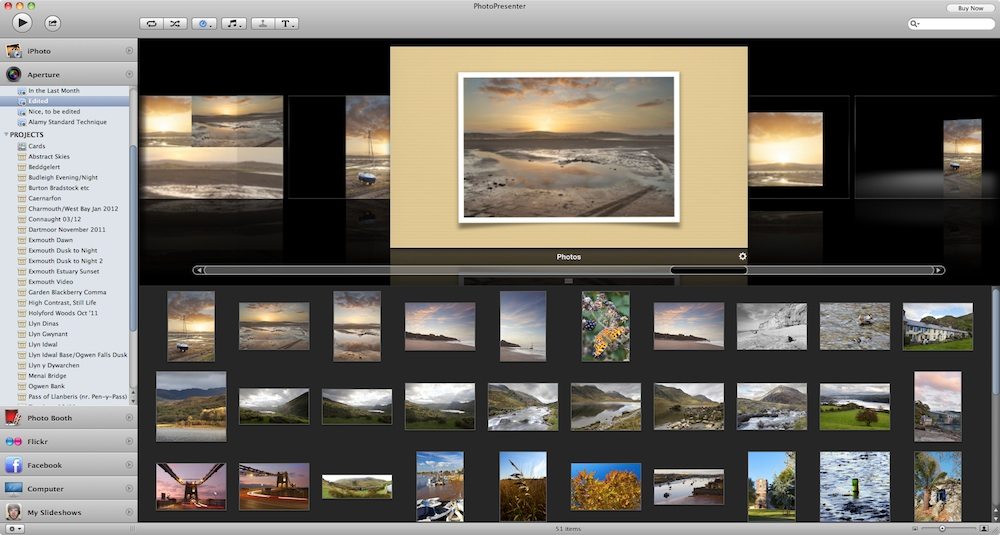
With PhotoPresenter 4, Boinx have gone for a well-balanced mix of the simple, yet powerful. Creating a great looking slideshow in this app is very easy if you want to simplify things; you can choose a folder or album in iPhoto, Aperture, Photo Booth or Flickr (or anywhere else on your Mac), and then choose a theme, at which point, you’re ready to play.

PhotoPresenter 4 has hidden depths, however. All of the slideshow styles or “themes” are customisable, with different frames and backgrounds available, and the ability to add captions and titles. You can also add music to any slideshow, and change the speed at which the images are played, including the option of syncing to the length of a music track.

Despite the high quality of the themes included in PhotoPresenter, some aren’t particularly usable for anything other than a screensaver. The zooming “Ken Burns” theme, for example, is almost unusable with certain image aspect ratios, whilst the “Wall” theme provides only a partial view of any picture at any time. Having said this, themes such as “Book” (a virtual photo album) and “Carousel” provide a classy and beautiful background to your images. Whether the handful of really good themes is enough to get you to purchase PhotoPresenter 4 is up to each individual’s judgement.

Read More→