Archive for Mac App Store

OSXcellence – TiltShift App for Mac Review

I, for one, am a fan of the tilt-shift effect. From miniaturisation of objects in images taken from on high, to Lensbaby-style artistic focus targeting, the results are always interesting. The only problem is that tilt-shift lenses are very difficult to operate. Many photographers have turned to Photoshop to recreate the tilt-shift effect digitally. The “does-what-it-says-on-the-tin” TiltShift (for Mac) tries to persuade that it is a better option.

Well it’s certainly a simple option. The focus hotspot is easily manoeuvred, with a drag-to-resize and move interface. This includes control of the graduation from sharp to blurred. Additionally, the amount of blur in “blurred” areas is adjustable (and you WILL need to adjust it, given the aggressive default setting). As a bonus, other simple adjustments such as brightness, saturation and contrast can be made, whilst an adjustable vignette can also be applied. The results are of good quality, particularly if your aim is miniaturisation. If you’re looking for Lensbaby-type swirly blur, then you need to look elsewhere.

TiltShift is a decent quality app, which produces results that are of high enough quality for any purpose. Having said this, would I pay $24.99/£17.49 for this one-function app? Well no, given I can do it for no extra investment using Photoshop…

TiltShift for Mac is available from the Mac App Store, and a demo is available from the TiltShift app homepage. Read More→

OSXcellence – PhotoEffectsLite Review

When scanning through the App Store’s top charts – a geeky ritual I perform every week, in the hope of finding a new exciting app to be downloaded, opened once, and cast aside, usually – I came across the app PhotoEffectsLite at the top of the free photography downloads. As I often do, I decided to download and try it, in the full knowledge that it may be another tacky technicolour-adding photo app.

To start with, PhotoEffectLite does differentiate itself from the pack by having 60 effects, although this stat alone does not necessarily make it a world-beater. These 60 effects, however, are all adjustable, not just in terms of strength, but also in other ways, such as the tone, saturation and brightness of colouration. You can drag images into the app window to edit, or use the Mac’s webcam, and examples of effects included are neon art, fisheye, city lights (multi-colour glow), glow, and false colour. Whilst images need to be selected carefully in order to get the best out of these effects, some pleasing results are possible.

Read More→

Apple's New Final Cut Pro X, a Revolution in Video Editing

June 22, 2011 – PRESS SUMMARY – Apple® announced Final Cut Pro® X, a revolutionary new version of the world’s most popular Pro video editing software which completely reinvents video editing with a Magnetic Timeline that lets you edit on a flexible, trackless canvas; Content Auto-Analysis that categorizes your content upon import by shot type, media and people; and background rendering that allows you to work without interruption. Built on a modern 64-bit architecture, Final Cut Pro X is available from the Mac® App Store™ for $299.99.

“Final Cut Pro X is the biggest advance in Pro video editing since the original Final Cut Pro,” said Philip Schiller, Apple’s senior vice president of Worldwide Product Marketing. “We have shown it to many of the world’s best Pro editors, and their jaws have dropped.”

Read More→

OSXcellence – ImageConvert Review

ImageConvert IconDigital image files go through a number of manipulations – the precise number varying on how excitable the photographer is in Photoshop – on their way from camera to print or online sharing. In addition, however, many images end up being changed from format to format, especially when the images are on their way to an image library.

To change single images between file types, programs such as Photoshop can be used to re-save the image into the desired file type, but this isn’t particularly quick or efficient.

A number of OSX apps offer an alternative to this method, allowing drag-and-drop conversion. One example of such an app is the not very imaginatively named, ImageConvert.

ImageConvert1

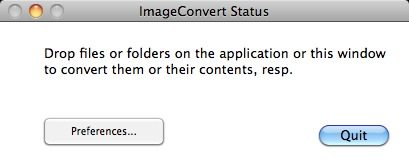
ImageConvert is probably one of the simplest apps available in any genre, providing the user with just two options – “preferences” or “quit.” Read More→

OSXcellence – HDRtist Review

HDRtist Logo

The technique of using several images to create a high dynamic range (HDR) end picture, so as to maximise the amount of the scene that is neither blown out white or black, is becoming more popular, with many people using it to create photo art. It can be a difficult process to achieve, however, especially if done manually using tone mapping, or even as a result of using professional HDR software, which can have a bewildering number of options.

Whilst many HDR junkies use complex software like Photomatix – which I would recommend if you want to produce HDR images regularly – for those who only wish to dabble or experiment with HDR on occasion, the relatively high price and complex nature of Photomatix makes it off-putting. For these HDR-dabblers, I must recommend they try the app, HDRtist.

Unlike many HDR apps, HDRtist is freeware, and as you might expect, doesn’t come with that many options; this is very much a “plug & play” app.

To create an HDR image, the user first inputs the base images into the app, and the app then processes these to give an HDR preview. The only controls then available to the user are “align” (tries to correct any differences between the multiple pictures, usually unsuccessfully), and the slider in the bottom left-hand corner of the app window – this adjusts the strength of the image blending. Read More→

OSXcellence – PhotoStamp Review

Anyone who shares their images online does so at the risk of their images being downloaded and used by pesky image thieves. Professionals, of course, aim to prevent this by watermarking their images, but considering it is such a routine thing, there are only a few Mac applications that deal with this task well.

I watermark my images using Softmatic’s Photostamp, now a Mac App Store exclusive, priced at £5.99 ($9.99 for US readers).

PhotoStamp has a very simple workflow, starting with image selection, then watermark selection or design, and placement, and lastly, image output settings.

Image selection is as easy as it’s possible for it to be – click to browse, or drag and drop.

To watermark, you can type text into the box, select an image to use, or use a predefined watermark; these can be added to, so a previously used text watermark can be selected. Text colour, font, size, rotation and opacity are all adjustable, in addition to being able to select one of nine alignments for the watermark. It is a shame that you can’t freely place a watermark as if it were a layer in Photoshop, but personally, I haven’t had a problem with this.

On the next page are the outputs options. Without going in depth, I will mention the fact you can output images as jpg, tif, bmp and gif files, as well as being able to resize images, set file names, and even produce thumbnail copies of the outputted images.

Read More→