So you’ve just walked in the door and put your bag down, now what? How do you get your files ready for HDR? I will describe how I import my brackets into (the best file management program ever) Aperture 3. 🙂
Step #1: Import
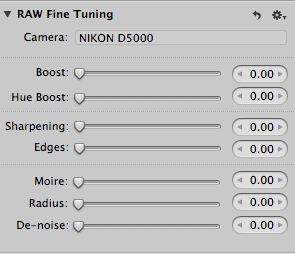
– Fire up Aperture 3. Under the “Adjustments” tab you’ll find “RAW Fine Tuning”. You’ll want to move all 7 sliders to “0” zero and create an hdr preset. (clicking on the gear icon will show the save preset option. More on why this is necessary later)
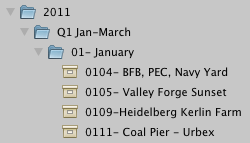
– Under the “Library” tab create a new “Folder” with the Year and another inside that folder with the Month.
– The “Import” tab should pop up and it will look something like this. Read More→

Scott Frederick is known for his photography of land, city and urban exploration. His styles vary from HDR to fine art black and white including minimalism. When not using his DSLR, he likes to use the iPhone Hipstamatic app for fun. He is an avid blogger and social networker, who strives to inspire everyone to see the world through photography. He’s been awarded Editor’s Pick at HDRSpotting.com and continues to educate himself and others on new tools and techniques. Feel free to ask him any questions you may have about photography.