Archive for Make Better Photographs – Page 4

Intention To Style – Behind My Eyes

One of the reasons I was excited to contribute to Current Photographer is that Trevor was willing to let me be a bit more non-specific in the theme of my articles. Even though most of my work in the past had been with HDR Photography, I knew that my passions were moving in other directions and I did not want to be nailed down to a particular genre or topic of the medium. I like the flexibility!

In a similar manner, I think an intentional development of a style is also limiting. Many photographers make a point of developing a unique style for a certain type of photography which helps them carve out a niche in the market they serve. For the sake of separation from their competition, their intent is totally understandable, and some of them have made a ton of money doing it. However, setting an intentional style to your photography can be limiting in what type of pictures you take and how they are made. No?

I’m not delusional. We all develop styles and trends in our work. As we take more and more pictures, we develop a like for certain compositions, lighting patterns, processing styles, etc, and incorporate them into the images we make. As a result, our images tend to take on style trends, whether we intend them to or not, but this is a natural process and one that typically is evolving and adapting to how we learn and experiment.

For example, over the past few years, the majority of the images I’ve posted were processed as bracketed HDRs or portraits of my son. A higher percentage of the HDR images were taken with a vertical frame and included a noticeable foreground element. Most were also processed using onOne’s Perfect Effects, with similar presets used in most of the pictures. My son’s portraits were predominantly processed using VSCO Film presets in Aperture to yield a consistent look to them, not by intention but because that’s what I like.

Currently, my passion has shifted to both long exposure and black and white conversion. Unless the situation calls for it, I seldom bracket images anymore. The black and white conversions have primarily taken place in Aperture, however, the Perfect B&W module of the Perfect Photo Suite 7 is growing on me quickly. Whether Aperture or Perfect B&W, the work in Perfect Effects has dwindled down.

Crossing The Stream

Read More→

A Photographer’s Diary, Tweaking the Image

Well by now I will assume that you have had your Christmas lunch and you are deciding whether that thought of a post lunch walk is such a good idea after all.

Most years I write an article about looking forward to the following year and writing about it as if it is done so the law of attraction can start to work its magic, and today I make no exception to that rule.  However, what I have realised myself that as this year draws to a close, just how closely my predictions for this year and other major things in my life have developed.

Read More→

A Photographer’s Diary, Hurricane Sandy

Since we were last together hurricane Sandy arrived on the west coast of America and beyond devastating people’s lives.  I have a friend and colleague who lives in one of the areas that were going to be hit and she sent out all her early warning messages to friends and family telling them of what was afoot.  It was extremely alarming just how wide reaching and severe the storm was forecast to be, and my thoughts over the next few hours were never far from Libby and her family.

Thankfully for them, this year, the part of Virginia where they live escaped the eye of the storm, this hasn’t been the case the last two years, they have had hundreds of dollars’ worth of damage to their property during hurricane season.

Read More→

Magic Lantern – Behind My Eyes

Being a fan of High Dynamic Range (HDR) Photography, I’ve become very intimate with the Auto Exposure Bracketing (AEB) function on my Canon camera. What I’ve come to realize is that obtaining the entire tonal range of an image at 1 EV increments can be difficult if your AEB settings will only allow 3 exposures to be produced. Sometimes -2, 0 and +2 are just not enough. If you have an extra $300+, you could purchase a Promote Control which offers amazing bracketing controls, but it’s hard to justify that kind of purchase for some of us.

Then, there’s Magic Lantern. It’s a third party software for Canon cameras (sorry Nikon) that sits on top of the camera’s firmware and adds awesome flexibility to DSLR video shooting, but also gives up to exposures for HDR bracketing and a cool Autodetect feature that takes some of the guesswork out of bracketing. I’ve been flirting with downloading the product onto my 60D for some time, but finally pulled the trigger a couple of weeks ago. The video below will take you through the options for bracketing on the 60D prior to having Magic Lantern, then will show how things have changed with it. Take a look.

Read More→

A Photographer’s Diary, Social Media Works!

Well it’s been a funny old month, it’s been a mixture of different things, and just in case you haven’t noticed this column has become monthly now, just to give me more time to concentrate on the business.

It’s had a lot of variations in it this month.  It started with my boyfriend and I going to a beer festival one Sunday afternoon to relax and taste some beers and it was an afternoon which started an interesting chain of events.

My boyfriend is absolutely fantastic at selling my business and takes every opportunity to tell people about what I do and how I can help them, he was doing this at the beer festival with a couple of the barman and in doing that, we discovered a kindred spirit there in someone who needed a bit of extra support and understanding.

Read More→

A Brush of Warmth – Behind My Eyes

One of the latest additions to the last revisions of Lightroom and Aperture is somewhat of a game changer in my book, and that’s the ability to apply a white balance setting selectively. Being an Aperture user, I have not experienced how the Lightroom option works, but based on the many discussions and posts people made when version 4 came out, I’m guessing it’s quite good.

The latest update to Aperture included a few new options for white balance, such as three types pertaining to how you’d like for the temperature of a picture to be adjusted: Natural Gray (new), Skin Tone (new) and Temperature and Tint (previous standard). The two new additions allow you to use a brush to selectively apply the effect.

For most folks, the big reason for using this new tool is when you have competing light sources within the same picture, like having both incandescent and natural window light in the same image. You can shoot for one and apply the other in post, evening out the image. My first experience, however, was from more of a creative need. Let me show you.

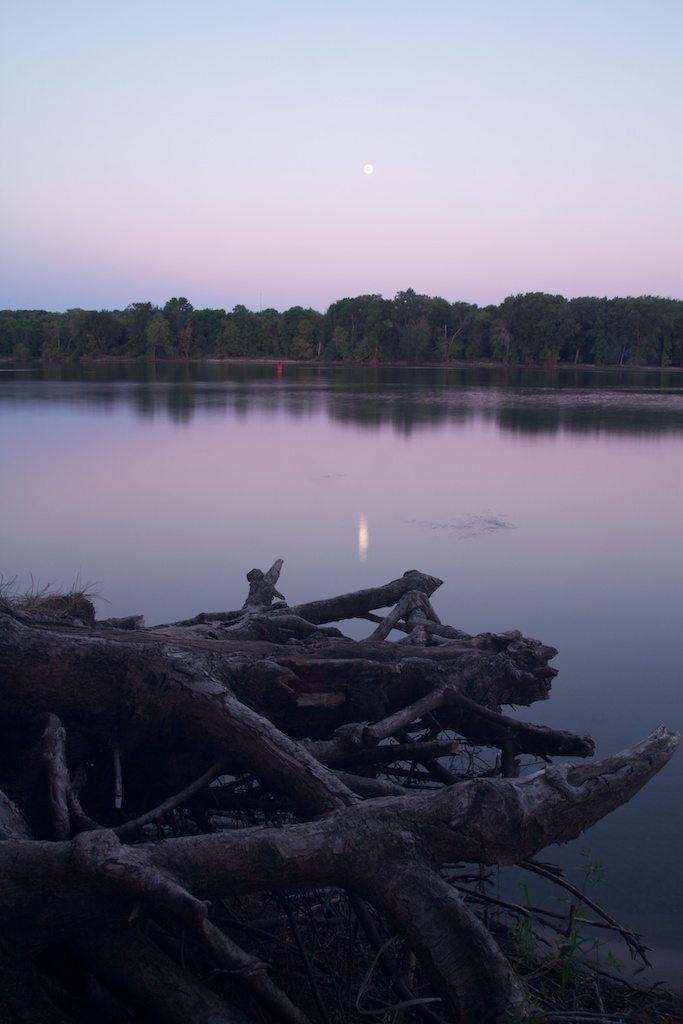
The image below is an 8 second long exposure taken at the Mississippi River in St. Paul Park, MN. That’s the Blue Moon in the sky reflecting off of the river and some rather interesting tree roots sticking out from the bank. There were two things in the image I wanted to make standout, the great blue and magenta tones in the sky (and watert) and the gnarly roots on the bank. I started with the sky colors.

Original Image – f18, ISO100, 8s, 19mm

Read More→