Archive for photo sharing

Marketing Campaigns for Photographers – Instagram

As a professional photographer you might scoff at the idea of using an app like Instagram to market your business. Or perhaps the fact that you’ll be using a camera phone to take and share images might chill you to the bone. But the fact of the matter is that Instagram is popular, very popular indeed so why wouldn’t you be embracing a popular photography community?

To be honest becoming a heavily followed and liked photographer in the Instagram community isn’t the target of this campaign but if that happens then it’s certainly a bonus.

The fact of the matter is that this campaign can be done on any number of photo sharing applications or networks, it’s just that Instagram ticks lots of the boxes that I need.

Using Instagram as a tool to promote your business.

There are several recommendations when it comes to the frequency of sharing on sites like Facebook, Tumblr or Twitter but there is an overwhelming agreement that daily sharing is essential to keep fans and followers engaged. The problem is that creating good daily content isn’t the easiest thing to do and it can be quite time consuming. Read More→

OSXcellence – CloudApp Review

And now, a first – a non-photography-specific app. But as you know, I wouldn’t be posting an app review unless it was useful for you photographers.

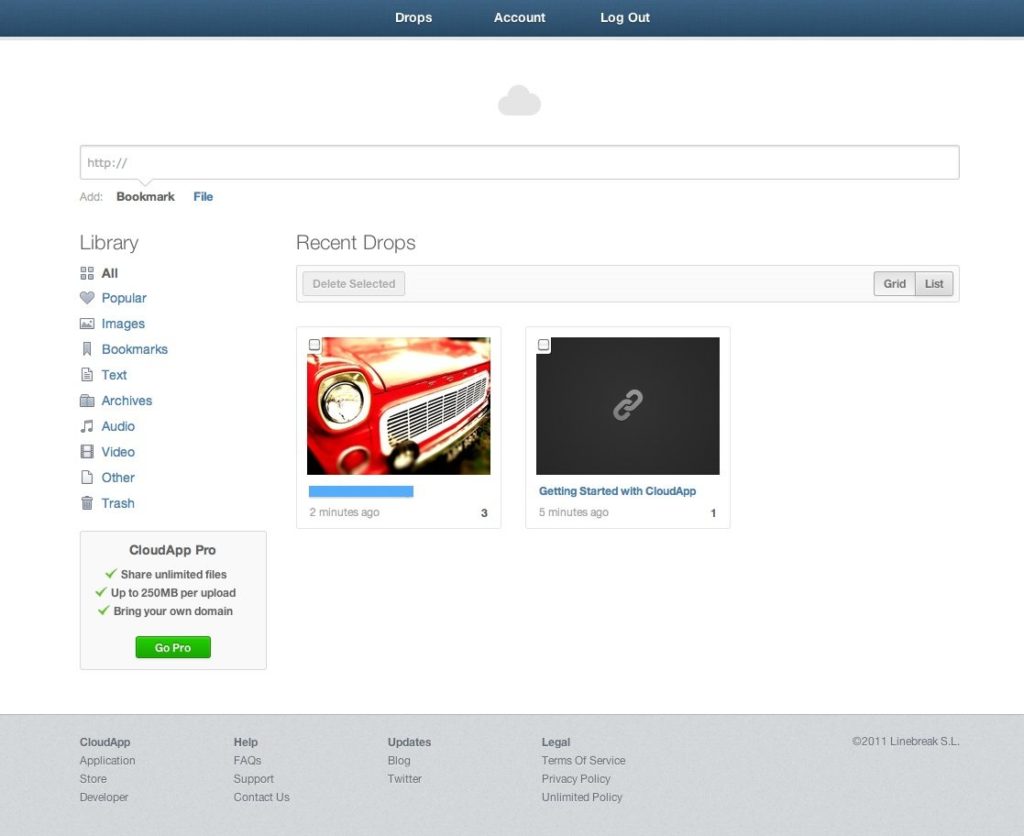
CloudApp is available from the Mac App Store for free, and is operated via a cloud-shaped menu bar item. The concept is one of seamless sharing of virtually any file, and from a photographer’s point of view, is a quick and simple method of sharing images online.

To share a file with CloudApp – supported formats include images, bookmarks, text, video and audio – all that is required is for the file to be dragged onto the CloudApp icon. This starts the upload, which seems very snappy (possibly even faster than Dropbox), and when this is complete, a desktop notification is displayed. Uploaded files are automatically assigned a (relatively) short link, which can then be used to share the file.

CloudApp’s drop-down menu displays your recent file uploads, which can then be clicked on, taking you to the file in question, and in addition, all files are also accessible via an Evernote-style web-app.

For anyone who wants to share images, CloudApp is the slickest way of doing so – I certainly can’t imagine using Photobucket again. Read More→

Share Multiple Images on Facebook and Twitter with Blurb iPhone App.

Since I have used Blurb to print books of some of my vacation photos, I imagined a Blurb app that would allow me to view my books on my iPhone. But that’s not the case. Instead, the Blurb app is another way to share your images via your mobile device. But there is a twist. Instead of sharing a single image as is the case with most apps, Blurb allows you to share up to 8 images in one Tweet, Facebook post, or email.

You start by clicking on “Create a New Story” on the home page. At this point, you may enter a title and description, and turn your location on or off. Next, you “Import Media”, which is as simple as clicking on up to 8 photos in your camera roll or library. You may then select from seven themes (or more if you upgrade to Plus). At this point you are ready to view the “Story” and share it with others.

So check it out if you want to send a Twitter or Facebook post with multiple photos. Here are a couple of “Stories” that I put together.

Hope you enjoy…MK

Tying The Knot: Raiders Of The Lost CD

1981. I was 9 years old and already developing a thing for leather and whips.

Not like that obviously. I had no idea what puberty was let alone a fetish! No, it was the year that Raiders Of The Lost Ark opened and in doing so created a generation of wannabe whip-cracking, gun-toting, adventure-seeking archaeology professors!

One of the most powerful scenes for me was the final one. You know it – the one where the old man wheels the crated Ark on a trolley through a warehouse the size of Texas to be buried down a non-descript aisle amongst thousands of other similar generic crates, presumably never to be seen again.

Sound familiar? Well it’s pretty much what happens every time I need to store a CD somewhere in my apartment!

But CDs are still popular amongst brides and near the top of a typical want list from a package.

Of course there’s nothing wrong with issuing a disc of images if it’s part of the package or an added extra. I do believe in promoting albums and books as the best way to showcase the best images of the day, but neither will hold the number of decent photos you should be taking. So a CD has become standard issue whether you like it or not.

In addition to being a storage medium, CDs are also wanted for security. It’s nice to know the disc is near you if you need it, right? Unless you live in my place of course!

But times have changed and there’s an education job to be done. Read More→

Eye-Fi Connects Your Digital Camera and Mobile Device for On-the-go Sharing

Eye-Fi LogoJan 7, 2011 – PRESS SUMMARY – Eye-Fi Inc., makers of the world’s first wireless memory card, announced Direct Mode at the Consumer Electronics Show in Las Vegas. Leveraging a combination of new technology in Eye-Fi cards and new Eye-Fi mobile apps, Direct Mode enables consumers to bring together the imaging quality of a digital camera and the connectivity of a smartphone or tablet in an unprecedented way. This innovative solution wirelessly connects the camera to the mobile device to provide a seamless experience between the moment a memory is captured and when consumers want to browse, edit, save and share their memories.

With Direct Mode, photos taken with your digital camera can immediately be sent to your smartphone or tablet. They can be viewed, used with myriad apps on the device, or uploaded and shared.

In addition, photos and videos can automatically and wirelessly be backed up and organized in the consumer’s private Eye-Fi View account. From there, they are accessible for viewing and sharing from any Internet connected device – regardless of which camera they were taken with. Read More→

HDRphotog.com – Where Photographers Go To Share HDR Images

HDRphotog.com LogoJuly 22, 2010 – My friend and fellow photographer Scott Wyden has created a great new website called HDRphotog.com. High dynamic Range Photographers is a collaborative blog where HDR Photographers can contribute their photographs to share with the community. You can also share links to other great HDR work found on the web.

HDRphotog.com is built on the Posterous.com platform. By signing up for a free Posterous.com account, you’ll have the ability to login to HDRphotog.com to submit your images rather than going through email. Posterous.com users can build their profile with links to their websites and social profiles giving them some added exposure. Read More→