Archive for Instagram

Instagram… Now with Pinch and Zoom!

Instagram-Zoom-300x300Instagram has become a powerful social network for photographers over the last few years. As Tweets fly by, and Facebook updates get buried in the stream, it has become harder and harder for photographers to get their photos (and message) in front of clients and prospects.

Many photographers have turned to Instagram as a way to promote their work. Everyone loves photos and there’s definitely no shortage of them on Instagram, but how many of them are really worth looking at? People want to see unique and beautiful photos, and that’s where the experienced photographer has the advantage over the smartphone food shooter.

A post shared by Instagram (@instagram) on

One of the frustrating things about Instagram photos is you can’t view them larger than what was displayed. All of the beautiful detail being captured is lost because of the small viewing size. Today that all changes!

Instagram released the ability to pinch and zoom on photos and videos in the feed, on profiles, and on Explore. This feature is available on iOS today and will be available on Android in the coming weeks.

So go create your art with all of its beautiful detail and share it with the world! And don’t forget to put your copyright and website address on it as well 😉

OSXcellence – PhotoStyler Review

PhotoStyler LogoInstagram has achieved astonishing popularity given its restricion to Android and iOS. At present, however, there is no true Mac equivalent to the easy styling found in Instagram. That’s not to say there aren’t plenty of fine “effects” apps available for OSX (see CameraBag 2 and FX Photo Studio Pro) – it’s just that none of them has the same speed and simplicity as the Facebook-owned mobile photo app. Well, when I say none…PhotoStyler from NeatBerry looks like it’s trying to be next best thing, but does it do the job?

Well the quantity of preset styles in PhotoStyler is not an area of concern. 138 are available, and can be ordered by tags, such as Retro or Lomo; you can also add your own tags, essentially allowing you to create custom groups of styles for easy access. If you want instant styling, you can just choose one of the presets, and you’re ready for upload or saving – conveniently, PhotoStyler includes the ability to upload pictures straight to Flickr or Facebook.

If you want more control, however, PhotoStyler allows you to tweak and tinker with the preset styles, or even create your own. The preset styles in PhotoStyler are actually combinations of “filters.” These are layers which add effects to your image; for example, the “Instant EK6” preset style consists of the polaroid-style frame and “Instant Photo” filter, the “Color of 70s” filter, which replicates the colour-warping which films of this era tended to exhibit, and the “Flare” filter. The result is a very believable film effect, and you can fine tune the look using the in-built filter adjustments, such as brightness and contrast.

PhotoStyler ScreenShot

Read More→

InstaCC Photo Challenges and Calendar View are Winners!

By now everyone has heard the news that Facebook has purchased Instagram for a cool billion dollars. While I have not heeded the call of the Facebook sirens (al a Homer’s Odyssey), I have slurped the cool sugary nectar that is Instagram. Okay, I am piling it on a bit thick, but that’s only because I am paid by the word (or not).

Back on topic. I do enjoy Instagram. Where else can you vicariously live the life of a complete stranger through a series of photos the size of a… Well, the size of a 1 and 7/8 inch square. Okay, you can’t really live their life, but you can look at photos of what they are having for dinner and see what the wing of the airplane they are on looks like out the window. Yes, we have ALL taken that picture.

So now that we have taken the picture of the wing of our plane or what we are having for dinner, what do we do with it? I have reviewed dozens of great apps for making your iPhone photos look even cooler than ever before. But InstaCC is a bit unique as it displays your photos in a camera view and prompts you to participate in photo challenges daily.

Here’s how it works. You log in with your Instagram username and password and allow InstaCC to have access to Instagram. You can post photos using the built in camera feature in the app. If you are working through a photo challenge, you will be given a choice whether to take a snapshot or to take a photo for the photo challenge. If you take the photo challenge your photo will be automatically hashtagged, which is important when you start to look at challenges. Read More→

Color Instagram Text + Adds Oomph to Your Instagram Messages

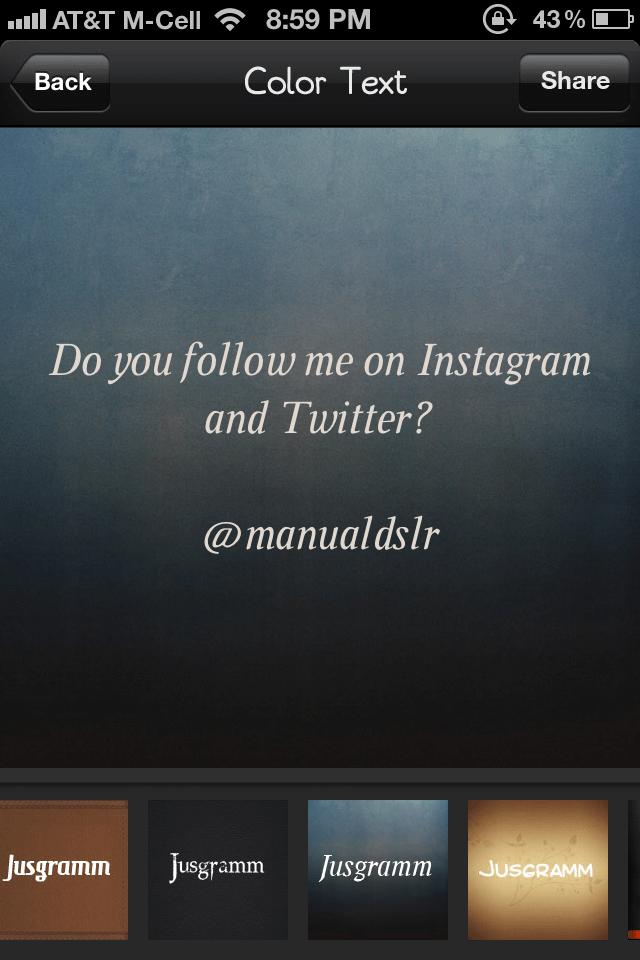
If you like Instagram like I do you sometimes need to share a typed message with your friends. In the past we might have used Notepad to write the message, take a screen shot and upload to Instagram. But Color Instagram Text + will change the way you do that. It’s very simple to operate and brings some pizazz…allure…oomph to your text-based messages.

Once you open the app you will see a simple box. Type your message and click “Next”. Here you are able to select your background/font combination. There are 13 options included and theme packs may be purchased in the app. The app is free but theme packs may be purchased for 99 cents to $1.99. Once you select your background you simply click “Share” to import into Instagram, copy and iMessage, save to photo album, or email.

1. Compose message. 2. Select effect. 3. Share. It is that simple.

If you follow me (@manualdslr) on Instagram or Twitter you will likely see some of these soon. Hope you enjoy!

All the best…Mike

Marketing Campaigns for Photographers – Instagram

As a professional photographer you might scoff at the idea of using an app like Instagram to market your business. Or perhaps the fact that you’ll be using a camera phone to take and share images might chill you to the bone. But the fact of the matter is that Instagram is popular, very popular indeed so why wouldn’t you be embracing a popular photography community?

To be honest becoming a heavily followed and liked photographer in the Instagram community isn’t the target of this campaign but if that happens then it’s certainly a bonus.

The fact of the matter is that this campaign can be done on any number of photo sharing applications or networks, it’s just that Instagram ticks lots of the boxes that I need.

Using Instagram as a tool to promote your business.

There are several recommendations when it comes to the frequency of sharing on sites like Facebook, Tumblr or Twitter but there is an overwhelming agreement that daily sharing is essential to keep fans and followers engaged. The problem is that creating good daily content isn’t the easiest thing to do and it can be quite time consuming. Read More→

OSXcellence – Lo-Fi Review

Back in the heyday of film photography, the effects of light leaking, blue flash and print yellowing were often bemoaned by many photographers striving for the best quality. As digital camera image quality has become exemplary, however, many people are using phone cameras and apps to recreate these effects to reignite their creativity – an example app being Lo-Fi.

Lo-Fi presents itself in a window shaped like the back of a camera, with all functions assigned to camera-like buttons. I have to say, this gives a slick and beautiful face to Lo-Fi, which makes adding effects very easy. The effects available include frame, film and “mood” (effectively a style, like burned out, or light-leak). The fact that multiple effects can be applied to each image or batch images differentiates Lo-Fi from other effect apps.

Read More→