 To be successful in todays times, all photographers need to be online and involved in social media. I always recommend having at least a blogsite to display your work and post articles that would be of interest to your clients, a Facebook profile and business page, and an active Twitter presence. In this tip I’m going to show you how to build a great looking, functional and branded Twitter profile page for your photography business.
First off, if you aren’t already on Twitter sign up for a free account. When selecting your username try to get your real name (ex. JohnSmith). It’s very possible that your name may be taken so try other variations (ex. John-Smith, JSmith, etc.). If your name isn’t available then try to use your business name. The right user name plays a very important part in your personal and business branding so make sure it reflects how you want to appear to your potential clients.
Setting Up Your Profile
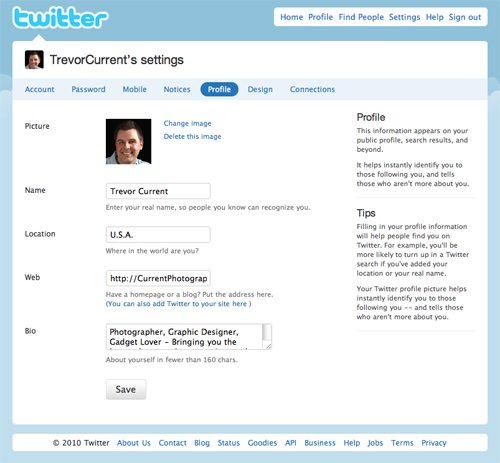
1. Log in to your account – Then click on the “Settings” tab at the top and then the “Profile” tab under your
user name.
2. Picture – It’s important to have a profile picture that reflects your brand. If you’re using your own name as your Twitter ID then I would suggest using a photo of yourself (happy smiling faces are more inviting than dark serious ones). If you’re using your business name as your Twitter ID then your company logo would be ok as long as it is recognizable at a small size. In Photoshop or another image editing program, crop your photo so it is 300 pixels x 300 pixels square. This will reduce down very nicely and also make for a nice enlargement should someone click on it in your profile page. Read More→

Founder of Current Photographer, co-host of The Digital Photography Cafe Show, Designer, Photographer, and overall tech geek.
 Google is the largest search engine out there and odds are pretty good that if someone wants to learn more about you or your company they’ll go to Google to search. Real quick, click on this link to go to


