Archive for Flickr

Have Camera, Will Travel – How I Prepare for a Trip: by Andrea Gonzales

You may be wondering how I prepare for a photography trip. Or maybe you aren’t…But I’m going to share anyway. 😉

Most of my travel is to major cities in the US and Canada…this is both good and bad. Good because there is plenty of easily accessible information about major cities on the Internet. Bad because, well, there is nothing “hidden,” or “secret,” or “unknown,” about major cities with plenty of easily accessible information.

Once I have a destination booked, I settle in with a cup of coffee and go down my list of websites:

TripAdvisor
Yelp
Local Convention and Visitors Bureau
Flickr
Google Images

On TripAdvisor I enter the city of choice, then select “Things to Do.” I read through the most recent reviews and take note of anything that piques my interest. I also check out “Restaurants,” and take note of any unique or unusual places to eat.

On Yelp I cross-reference my restaurant suggestions from TripAdvisor. Occasionally restaurant reviews on Yelp will yield further recommendations for places to go or things to do. For example “Restaurant X is the perfect lunch spot after a morning at Museum Y.”

Now that I have a list of restaurants, museums, parks, and other things to do I Google the city’s convention and visitor’s bureau (CVB) or tourist site. Here I can find out about any events that are happening during my stay that may be of interest. Many CVB’s offer a discount pass for local attractions, so this is something I evaluate here as well. Most of these sites have a tab for “Media” or “Journalists.” On this page there are often story ideas, which may give some inspiration for less tourist-y, less well-known places to see or things to do. If available, I also check out “How to Get Around.”

If there are museums or other indoor locations on the list, I check their individual websites for hours of operation, admission and photography guidelines.

On a recent trip to Calgary I decided to visit the Glenbow Museum after learning that photography was permitted in virtually all of their permanent exhibits.


On the other hand, at the National Art Gallery of Canada in Ottawa photography is not permitted in the galleries but it is permitted in the common areas between the galleries.
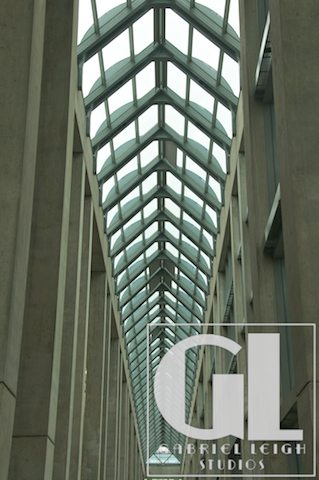
When I was researching the National Art Gallery of Canada I noticed on their website that an exhibit of models, drawings and photographs from the architect who designed their building was beginning on the third day of my trip. I had originally planned to visit this location on the second day of my trip, but delayed so that I could see the architect’s exhibit. I had brought my camera to photograph the exterior and common areas and as I entered the architect’s exhibit I made a concerted effort to turn it off, put the lens cap on and sling the camera behind my back so I wouldn’t get in any trouble. A security guard actually stopped me and explained that for this particular exhibit I was not only welcome but encouraged to photograph. This was completely unexpected but a great surprise!

Finally, after I have my list of places I want to visit I head to Flickr and Google Images. I search for images of both the city itself and the individual locations I am interested in. This way I can be sure I get the “iconic” images and I can also begin to plan how I can make more unique images. I also sometimes search on iStock to see what kind of images may be saleable.

Once I have a pretty good idea of where I want to go, I save all of the relevant websites to a folder labeled with the name of the city. I also save information regarding public transportation (route maps, schedules, fares).



Andrea GonzalesGabriel Leigh Studios was established in 2009 as a photography studio specializing in travel and commercial stock photography.

Andrea Gonzales has been in love with photography and travel for as long as she can remember.  After several years of hard work she was able to leave the daily 9-5 grind in July 2010 and now travels as often as possible.

Gabriel Leigh StudiosCompany: Gabriel Leigh Studios
Website: http://www.gabrielleighstudios.com
Facebook:
 https://www.facebook.com/AndreaGonzalesPhotography/


Here’s how you can share your tips, techniques and tutorials on CurrentPhotographer.com

–

OSXcellence – LightFrame Review

Great images will always be pleasing on the eye, but the overall impression a viewer will get is dependant on how that image is presented. This includes factors such as whether the image is digital or on paper, editing quality, but also framing. Whilst you can just go out and buy a frame for printed pictures, digital images need the help of some software to make them stand out. LightFrame uses OSX’s in-built textures to superimpose digital frames around your pictures, but is it a presentation improver or degrader?

The first thing I noticed about LightFrame is how dodgy the viewing controls are. I tried to zoom in and out of the picture, but just ended up with a semi-zoomed-in view which was heavily distorted – not a good start. Loading up the tools in LightFrame is easy enough (assuming you guess that the “scenes” button opens up the tool palette), as is the process of using the tools themselves. Alongside the framing options, LightFrame has a number of other features, such as the ability to add a caption or sprite to the image, plus image cropping and resizing.

The textured frames in LightFrame are terrible, looking like something grabbed from a gaudy mid-90s web page. On the plus side, the plain colour frames look okay, and LightFrame’s in-built shadow creator is pretty nifty, allowing you to select the angle of light. In addition, LightFrame can create borderless frames (like the clip ones); that is, it can create the shiny effect of its real-life counterpart.

The rest of the functions in LightFrame work well enough, although the list of apps out there that will perform the exact same functions (many being free, I should add) is the size of several directories. It is also worth noting that many of LightFrame’s rivals work a great deal better. Read More→

Marketing Campaigns for Photographers – The Fabulous Five

Your blog is undoubtedly the most powerful online marketing tool you have at your disposal but if you think that you can rely on SEO and cleverly written post titles to drive traffic your way then think again.


Your blog coupled with the right amount of social media sharing is an effective marketing combination. The question I am often asked is what social networks are best to promote your business and ultimately get more work.

There’s no real answer to that other than there isn’t just one. There isn’t really a typical client for every type of business but there are a few generalisations which can help you.

This marketing campaign is titled The Fabulous Five because it is about identifying at least 5 different social networks where you can drive traffic and potential clients to your site.

Why 5?
Well if you have the time to share on 10 different platforms then don’t let me stop you! Using 5 different social media platforms should be manageable enough and it also gives you a varied enough spread.

Read More→

Top 5 Social Media Sites To Promote Your Photography: by Mike Barbre

Are you a young photographer trying to promote your name? Or perhaps you are a veteran professional looking to expand your marketing base. Either way there are several social media sites that can be used to promote your photography

Facebook
Facebook is more than a site for you to connect with long-lost friends. It is also a powerful marketing tool. Set up a page specifically to promote your photos, not your personal profile page. People can become a ‘Fan’ of your page by ‘Liking’ it and can interact with you through the Wall feature. Whenever you post a comment or new photos anyone who is a fan will see these updates.

Post your photos individually and on thematic albums. Always be consistent in updating your page but don’t overload it on a daily basis, you want to keep your fans interested and surprised. Ask them for feedback to increase the interaction between you, your photos and your ‘Fans’.

Twitter
Twitter is a social networking site that allows users to post 140 character updates, called tweets. With a Twitter profile you choose which user tweets to follow. You can tell people about new projects, upcoming exhibitions or simply share a photography tip of the day, making you an online expert source.

You can add your photos to Twitter through its companion site, TwitPic. As the URLs of TwitPic are short they are readily usable on Twitter. Recently there have been discussions on the Terms of Use of TwitPic who may be able to sell your pictures to a third-party without any credit to you, so make sure you read the Terms and Conditions carefully before sharing your images. Read More→

Take, Edit and Share Images with Instagram!

How did I miss this one? I had seen Twitter messages linked to the http://instagr.am web site and I thought they were cool, but somehow I missed what Instagram was all about. Thankfully, my 20-year-old son who is away at college clued me in to this one. So how do you describe Instagram? iPhone camera app? Filter preset app? Photo upload site? Social networking site? I would have to say “yes” to each.

The thing that strikes me about Instagram is its ease of use. Since I have started using this app to upload my iPhone photos to Twitter, I have uploaded many more pics than before. It’s so quick and easy that I would consider it effortless.

So here is how it works. There are five tabs at the bottom of the screen. The middle one, labeled “Share” allows you to take a photo using the front facing camera or main camera, or to select a photo from your camera roll. While you do not have access to zoom, you may turn the flash on, off, or on automatic. Once a photo is taken or selected, you move and scale to a square shape. You then apply filters. The next step is to post it to Instagram and to any or all of your social networking sites. The app currently supports sharing to Twitter, Facebook, Flickr, Posterous, Tumblr and Foursquare. Read More→

My Top 50 Grunge and Urban Exploration Photos

Dead Red Truck Abandoned Barn With Tin Roof (2) Abandoned Gas Station Along NY-147 (15) Hogback Ski Area (2) Goodwill Poultry Farm (2) Abandoned Train Depot - Stairs To Cellar The Wait Is Forever Sink Abandoned Train Depot - Full View Seashore Trolley Museum 4 Abandoned Hydro Plant 6 Dead Car (1 of 6) Empty House 1 - 1 Bathtub of Debris (2) Crooked Home (1) Broken Home (5) Abandoned Industrial Washing Machine In Winter Locomotive Graveyard (18) Dead Locomotive Kitchen From Doorway Abandoned Industrial Mine (1) ESP (17) Empty House 1 - 16 The Life They Let Slip Away (Holga Edit) Old Phone dummy2 Abandoned Farmhouse, Burned (10) Closed Gas Station 2 Red Apple Rest (11) Dead Crane Truck (2) ESP (39) Abandoned Industrial Mine (8) Empty Train Car (2) Farmhouse Dining Room (2) Broken Home (2-2) Abandoned Rail Yard (9) Abandoned Hydro Plant 2 Destroyed Office Goodwill Poultry Farm (1) Rockland Drive-In (1) Abandoned Sunoco Gas Station (1) Abandoned Gas Station Along NY-147 (10) Locomotive Graveyard (8) Red Apple Rest (13) No Radar - Grunge Edit Baby Stroller The Delaware Inn Noir Vignette Abandoned Dam Destroyed Box
–
Grunge, and Urban Exploration photography have played a major part of my photographic vision. Over the years, I have photographed abandoned places of all kinds. Shown here are just a sampling of what is available on my Flickr Photostream. Over the years, I have had the unique opportunity to explore photograph abandoned gas stations, houses, industrial and agricultural centers, hidden underground passageways, abandoned hospitals, forgotten commercial enterprises, and of course, railroad yards and stations. What I have provided here is what I consider to be my top 50 most influential and thought-provoking shots.