Archive for Computers & Software – Page 5

OSXcellence – Photo Sense for Mac Review

So you have a Mac? And you want to make your images look better? But you can’t be bothered to use iPhoto’s manual editing controls? And you want to use auto-enhancement on batch images? And you’re willing to pay two-thirds of the price of Photoshop Elements to get something that performs this function only (which, of course, Elements can do – a lot better)?

Well, whilst I would suggest that you are a fairly niche target market, the market that you represent is catered for (or so the makers, VeprIT, hope anyway) by Photo Sense for Mac.

The process of “improving” pictures with Photo Sense starts with adding images, which have their previews immediately “enhanced.” The options for processing include the standard exposure, contrast and saturation adjustment, as well as noise reduction and sharpening. In addition, effects can be added, although the extent to which you use most of those included very much hinges on “personal taste”.

By clicking on each individual image, you can manually adjust it, with the aid of a histogram and a split-screen before and after.

As with most auto-enhancers, the results of Photo Sense’s default processing are at best, “dramatic”, and at worst, disasters. Whilst the heady mix of over-sharpening, super-saturation and ridiculously boosted contrast can be attention grabbing, the thought of allowing these images into print fills me with dread.

Read More→

OSXcellence – CameraBag 2 Review

The original CameraBag was one of the first style and edit apps, not only on Mac, but on iPhone too. It was well built, and performed well, but since then it has been trumped by FX Photo Studio Pro (see my review) in this category. Now, however, the folks at NeverCenter have come back fighting, with their new offering, CameraBag 2.

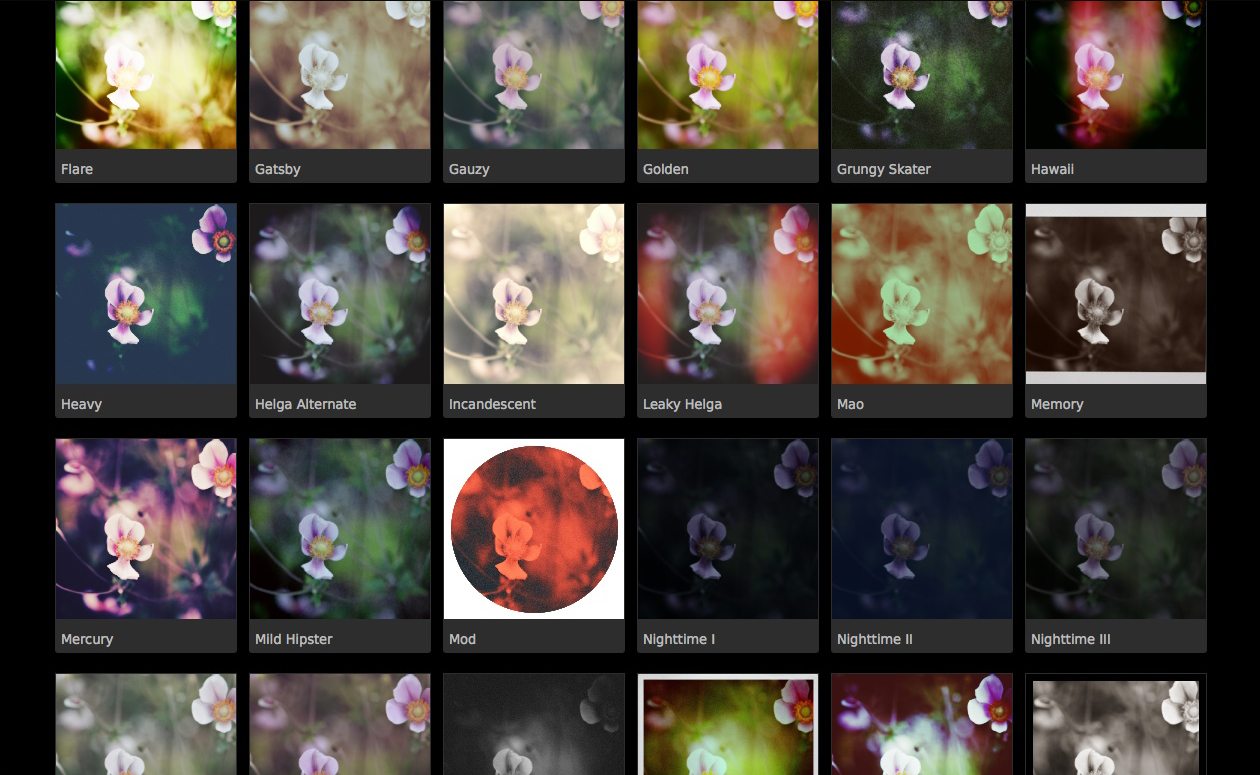
CameraBag 2 is a slick looking app, but pretty looks aren’t the main feature of this app. Editing is conducted using impressive 32-bit processing, RAW is supported, and editing is non-destructive – all high-level features, aimed at the serious photographer. CameraBag 2 includes 100+ filters under the Styles tab, but far more important than this are the editing controls under the Adjust tab. Here you find the standard fare of contrast, saturation, exposure and so on, but additionally, more higher-level controls, such as RGB and luminance curves, selective saturation and grain. When these are used in conjunction with the adjustable inbuilt filters, almost any effect is achievable. What is striking is the quality of manipulated images, thanks to the 32-bit processing; this app produces classy, print quality pictures.

The preset filters that come with CameraBag 2 are very nice, both in terms of quality and quantity. Most are based on various print or film types and techniques, and are (in my opinion) very stylish. Examples include “Cyanotype,” “Leaky Helga” and “Super 1962.”

Read More→

Nevercenter Redesigns Photo Editing With CameraBag 2

February 2, 2012 – PRESS SUMMARY – Nevercenter released CameraBag 2 for Mac and PC, a desktop photo app with a whole new approach to photos. Redesigned from the ground up, CameraBag 2’s new Analog Engine pairs a full suite of photographic tools with the high quality filters and vintage simulations the series is already known for. Its key innovation is a stunningly straightforward approach to layering, rearranging, and endlessly tweaking all of these effects in realtime. The 100+ fully-adjustable filters and 25+ professional controls CameraBag 2 ships with are only the beginning, forming the palette from which users create their own styles.

Read More→

OSXcellence – Inpaint Review

“DAMN!” – you’ve taken a world-beating image, but just as you’re about to Google “Wanderlust photo competition,” a terrible reality dawns on you. There is some pesky passer-by’s blurred head in the bottom corner. What are you going to do?

Teorex, the makers of Inpaint, would no doubt suggest that you head for their app.

Inpaint (temporarily on special offer at £0.69/$0.99) is an app specialising in removing unwanted objects from your image.

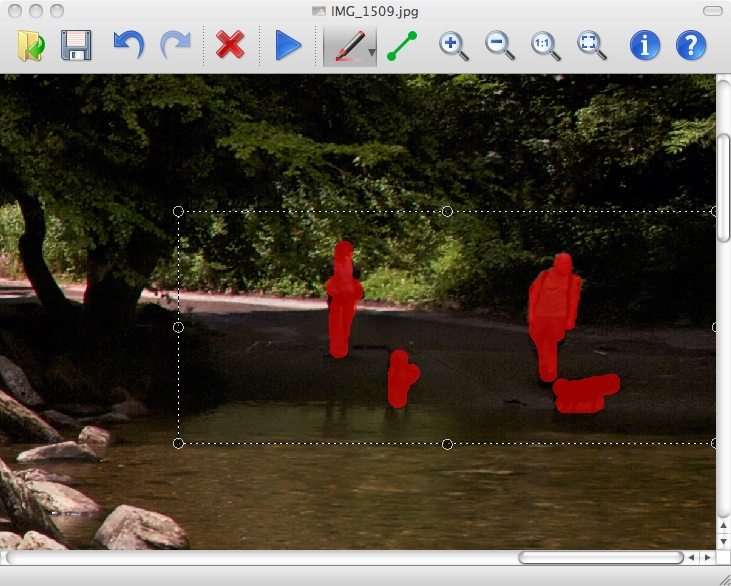
The name implies Inpaint’s method of operation – paint a red overlay onto the objects you wish to remove, and hit the “Inpaint” button to get the app working. The cloning is reasonably snappy, only taking 20 seconds or so, and the results, at first glance, are respectable. Areas in the image around the objects to be cloned are copied, in a manner not unlike Photoshop’s dust cloning tool.

Read More→

OSXcellence – PhotoZoom Pro 4 Review

For some photographers, the need to enlarge an image comes before uploading to a stock library. For others, it’s before a large print is made of the image. But sure enough, for whatever reason, all photographers at some point need to play around with digital image sizing. Photoshop is often used, mostly due to its already prominent place in most photographers’ workflows, whilst hardcore upscalers invest in Genuine Fractals (now known as Perfect Resize). BenaVista hopes that some may turn to their own contender in this market, PhotoZoom Pro, which (as a package) can be used both as a standalone app and photoshop plug-in resizer.

PhotoZoom Pro 4 claims to beat all of the standard resizing methods mentioned above, aided by its “patented S-Spline algorithm” – no, I don’t know what that means either (anyone brave enough can view the basics on Wikipedia). First impressions suggest that whatever S-Spline may be, it helps – this app certainly holds its own compared to other resizers. Small enlargements seem to have no discernible effect on image quality, whilst the results when an image is enlarged to 150% are respectable; stock library standard? Maybe.
Large print of your Grandmother’s dog for her
wall standard? Certainly. Read More→

OSXcellence – Pixlr-o-matic

For some time now, I have admired and used Pixlr-o-matic for adding style to my images. Only now, however, can I feature it in this column, as a Mac version has recently been released.

Pixlr-o-matic doesn’t have the largest range of styles; in fact, it has very few in comparison to other more popular filter apps. The reason I believe Pixlr-o-matic stands out from the crowd is due to the attractiveness, and careful selection, of the filters installed. As a result, when I want one-click stylising of an image, I rarely need to venture further than this app.

Pixlr-o-matic’s interface is very simple, with a live preview illustrating the current effects applied. Filters come on a “film-strip” which is dragged sideways to scroll through the options. The simplicity of this app’s system is refreshing, with a maximum of three effects applicable on any single image – a colour/exposure/sharpness layer, a texture/damage/artistic layer, and a frame layer. None is obligatory, and that’s a good thing, considering that most of the middle stage’s filters range from bizarre to ugly to pointless. The other two layers by themselves, however, provide truly stunning results which replicate great film effects of the past.

Read More→